


 |
Start of Tutorial > Start of Trail > Start of Lesson | Lesson Contents |

|
Trail: 2D Graphics |
|
Lesson: Manipulating and Displaying Images |
|
Help
on searching
Search technology |
Using a BufferedImage for Double Buffering
When a graphic is complex or is used repeatedly, you can reduce the time it takes to display it by first rendering it to an off-screen buffer and then copying the buffer to the screen. This technique, called double buffering, is often used for animations.
Note: When you are rendering into a Swing component, Swing automatically double-buffers the display.
A BufferedImage can easily be used as an off-screen
buffer. To create a BufferedImage whose color space,
depth, and pixel layout exactly match the window into which you're
drawing, call the Component createImage
method. If you need control over the off-screen image's type or
transparency, you can construct a BufferedImage object
directly and use it as an off-screen buffer.
To draw into the buffered image, you call the BufferedImage
createGraphics method to get a Graphics2D object;
then you call the appropriate rendering methods on the
Graphics2D. All of the Java 2D API rendering features can
be used when you're rendering to a BufferedImage that's
being used as an off-screen buffer.
When you're ready to copy the BufferedImage to the screen,
you simply call drawImage on your component's
Graphics2D and pass in the BufferedImage.
Example: BufferedShapeMover
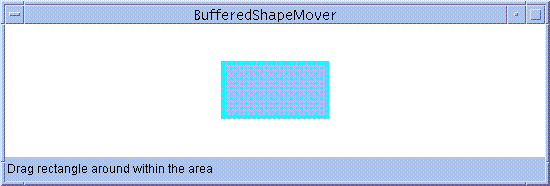
This program allows the user to drag a rectangle around within the applet window. Instead of rendering the rectangle at every mouse location to provide feedback as the user drags it, aBufferedImageis used as an off-screen buffer. As the rectangle is dragged, it is re-rendered into theBufferedImageat each new location and theBufferedImageis blitted to the screen.
This figure has been reduced to fit on the page.
Click the image to view it at its natural size.You can see the complete program in
BufferedShapeMover.java, and here's an HTML file that includes the applet,BufferedShapeMover.html.Here is the code used to render into the
BufferedImageand display the image on the screen:public void updateLocation(MouseEvent e){ rect.setLocation(last_x + e.getX(), last_y + e.getY()); ... repaint(); ... // In the update method... if(firstTime) { Dimension dim = getSize(); int w = dim.width; int h = dim.height; area = new Rectangle(dim); bi = (BufferedImage)createImage(w, h); big = bi.createGraphics(); rect.setLocation(w/2-50, h/2-25); big.setStroke(new BasicStroke(8.0f)); firstTime = false; } // Clears the rectangle that was previously drawn. big.setColor(Color.white); big.clearRect(0, 0, area.width, area.height); // Draws and fills the newly positioned rectangle // to the buffer. big.setPaint(strokePolka); big.draw(rect); big.setPaint(fillPolka); big.fill(rect); // Draws the buffered image to the screen. g2.drawImage(bi, 0, 0, this); }
|
|
Start of Tutorial > Start of Trail > Start of Lesson | Lesson Contents |