


 |
Start of Tutorial > Start of Trail > Start of Lesson | Lesson Contents |

|
Trail: Writing Applets |
|
Lesson: Taking Advantage of the Applet API |
|
Help
on searching
Search technology |
Sending Messages to Other Applets
Applets can find other applets and send messages to them, with the following security restrictions:- Many browsers require that the applets originate from the same server.
- Many browsers further require that the applets originate from the same directory on the server (the same code base).
- The Java API requires that the applets be running on the same page, in the same browser window.
Note: Some browsers let applets invoke methods on other applets -- even applets on different pages in the same browser -- as long as all of the applets come from the same code base. This method of interapplet communication isn't supported by the Java API, so it's possible that it will not be supported by all browsers.
An applet can find another applet
either by looking it up by name
(using the AppletContext getApplet method)
or by finding all the applets on the page
(using the AppletContext getApplets method).
Both methods, if successful,
give the caller one or more Applet objects.
Once the caller finds an Applet object,
the caller can invoke methods on the object.
Finding an Applet by Name: The getApplet Method
The
getAppletmethod looks through all of the applets on the current page to see if one of them has the specified name. If so,getAppletreturns the applet'sAppletobject.By default, an applet has no name. For an applet to have a name, one must be specified in the HTML code that adds the applet to a page. You can specify an applet's name in two ways:
- By specifying a
NAMEattribute within the applet's<APPLET>tag. For example:<APPLET CODEBASE=example/ CODE=Sender.class WIDTH=450 HEIGHT=200 NAME="buddy"> . . . </applet>- By specifying a
NAMEparameter with a<PARAM>tag. For example:<APPLET CODEBASE=example/ CODE=Receiver.class WIDTH=450 HEIGHT=35> <PARAM NAME="name" value="old pal"> . . . </applet>
Browser Note: Although at least one Java-enabled browser conducts a case-sensitive search, the expected behavior is for thegetAppletmethod to perform a case-insensitive search. For example,getApplet("old pal")andgetApplet("OLD PAL")should both find an applet named "Old Pal".Below are two applets that illustrate lookup by name. The first, the Sender, looks up the second, the Receiver. When the Sender finds the Receiver, the Sender sends a message to the Receiver by invoking one of the Receiver's methods (passing the Sender's name as an argument). The Receiver reacts to this method call by changing its leftmost text string to "Received message from sender-name!".
This figure has been reduced to fit on the page.
Click the image to view it at its natural size.
Note: Because some old browsers don't support 1.1, the above applets are 1.0 versions. Here are links to the 1.0 code for the Sender and Receiver classes. To run the 1.1 versions of the applets, go toexample-1dot1/iac.html.
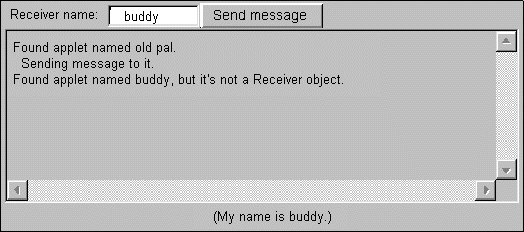
Try this: Click the Send message button of the top applet (the Sender). Some status information will appear in the Sender's window, and the Receiver will confirm (with its own status string) that it received a message, After you've read the Receiver status string, press the Receiver's Clear button to reset the Receiver. In the Sender's text field labeled "Receiver name:," type inbuddyand press Return. Since "buddy" is the Sender's own name, the Sender will find an applet named buddy but won't send it a message, since it isn't a Receiver instance.Here's the whole Sender program. The code it uses to look up and communicate with the Receiver is listed below. Code that you can use without change in your own applet is in bold font.
The Sender goes on to make sure that the Receiver was found and that it's an instance of the correct class (Applet receiver = null; String receiverName = nameField.getText(); //Get name to search for. receiver = getAppletContext().getApplet(receiverName);Receiver). If all goes well, the Sender sends a message to the Receiver. (Here's the Receiver program.)if (receiver != null) { //Use the instanceof operator to make sure the applet //we found is a Receiver object. if (!(receiver instanceof Receiver)) { status.appendText("Found applet named " + receiverName + ", " + "but it's not a Receiver object.\n"); } else { status.appendText("Found applet named " + receiverName + ".\n" + " Sending message to it.\n"); //Cast the receiver to be a Receiver object //(instead of just an Applet object) so that the //compiler will let us call a Receiver method. ((Receiver)receiver).processRequestFrom(myName); } } . . .From an applet's point of view, its name is stored in a parameter named
NAME. It can get the value of the parameter using theApplet getParametermethod. For example, Sender gets its own name with the following code:myName = getParameter("NAME");For more information on using
getParameter, see Writing the Code to Support Parameters.The example applets in this page perform one-way communication -- from the Sender to the Receiver. If you want your receiver to be able to send messages to the sender, then you just need to have the sender give a reference to itself (
this) to the receiver. For example:((Receiver)receiver).startCommunicating(this);
Finding All the Applets on a Page: The getApplets Method
ThegetAppletsmethod returns a list (anEnumeration, to be precise) of all the applets on the page. For security reasons, many browsers and applet viewers implement
getAppletsso that it returns only those applets that originated from the same host as the applet callinggetApplets. Here's an applet that simply lists all the applets it can find on this page:
Note: Because some old browsers don't support 1.1, the above applet is a 1.0 version (here is the 1.0 code; here's the 1.1 code). To run the 1.1 version of the applet, go toexample-1dot1/iac.html. For more information about running applets, refer to About Our Examples.Below are the relevant parts of the method that calls
getApplets. (Here's the whole program.)public void printApplets() { //Enumeration will contain all applets on this page (including //this one) that we can send messages to. Enumeration e = getAppletContext().getApplets(); . . . while (e.hasMoreElements()) { Applet applet = (Applet)e.nextElement(); String info = ((Applet)applet).getAppletInfo(); if (info != null) { textArea.appendText("- " + info + "\n"); } else { textArea.appendText("- " + applet.getClass().getName() + "\n"); } } . . . }
|
|
Start of Tutorial > Start of Trail > Start of Lesson | Lesson Contents |