


 |
Start of Tutorial > Start of Trail | Lesson Contents |

|
Trail: Writing Applets |
|
Help
on searching
Search technology |
Overview of Applets
This lesson discusses the parts of an applet. If you haven't yet compiled an applet and included it in an HTML page, you might want to do so now. Step by step instructions are in Getting Started: The "Hello World" Applet .
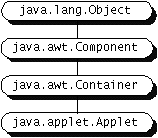
Every applet is implemented by creating a subclass of the Applet class.
The following figure shows the inheritance hierarchy of the Applet class.
This hierarchy determines much of what an applet can do and how,
as you'll see on the next few pages.
A Simple Applet
Below is the source code for an applet calledSimple. TheSimpleapplet displays a descriptive string whenever it encounters a major milestone in its life, such as when the user first visits the page the applet's on. The pages that follow use theSimpleapplet and build upon it to illustrate concepts that are common to many applets. If you find yourself baffled by the Java source code, you might want to go to Learning the Java Languageto learn about the language.
/*
 * 1.0 code.
 */

import java.applet.Applet;
import java.awt.Graphics;

public class Simple extends Applet {

    StringBuffer buffer;

    public void init() {
	buffer = new StringBuffer();
        addItem("initializing... ");
    }

    public void start() {
        addItem("starting... ");
    }

    public void stop() {
        addItem("stopping... ");
    }

    public void destroy() {
        addItem("preparing for unloading...");
    }

    void addItem(String newWord) {
        System.out.println(newWord);
        buffer.append(newWord);
        repaint();
    }

    public void paint(Graphics g) {
	//Draw a Rectangle around the applet's display area.
        g.drawRect(0, 0, size().width - 1, size().height - 1);

	//Draw the current string inside the rectangle.
        g.drawString(buffer.toString(), 5, 15);
    }
}
The Life Cycle of an Applet
You can use the Simple applet to learn
about the milestones in every applet's life.
Methods for Milestones
The Applet class provides a framework for applet execution,
defining methods that the system calls
when milestones -- major events in an applet's life cycle -- occur.
Most applets override some or all of these methods
to respond appropriately to milestones.
Methods for Drawing and Event Handling
Applets inherit the drawing and event handling methods
of the AWT Component class.
(AWT stands for Abstract Windowing Toolkit;
applets and applications use its classes
to produce user interfaces.)
Drawing refers to anything related to
representing an applet on-screen --
drawing images,
presenting user interface components such as buttons,
or using graphics primitives.
Event handling refers to detecting and processing
user input such as mouse clicks and key presses,
as well as more abstract events
such as saving files and iconifying windows.
Methods for Adding UI Components
Applets inherit from the AWTContainerclass. This means that they are designed to holdComponents-- user interface objects such as buttons, labels, pop-up lists, and scrollbars. Like otherContainers, applets use layout managers to control the positioning ofComponents.
What Applets Can and Can't Do
For security reasons, applets that are loaded over the network have several restrictions. One is that an applet can't ordinarily read or write files on the computer that it's executing on. Another is that an applet can't make network connections except to the host that it came from. Despite these restrictions, applets can do some things that you might not expect. For example, applets can invoke the public methods of other applets on the same page.
Test Driving an Applet
Once you've written an applet,
you'll need to add it to an HTML page
so that you can try it out.
This section tells you how to use the
<APPLET> HTML tag
to add an applet to an HTML page.
Summary
After you've read every page in this lesson, you'll have seen almost everything you need to be able to write applets.
|
|
Start of Tutorial > Start of Trail | Lesson Contents |