


 |
Start of Tutorial > Start of Trail > Start of Lesson | Lesson Contents |

|
Trail: Essential Java Classes |
|
Lesson: Reading and Writing (but no 'rithmetic) |
|
Help
on searching
Search technology |
How to Use Pipe Streams
PipedReader and
PipedWriter (and their input and output stream counterparts
PipedInputStream and
PipedOutputStream)
implement the input and output components of a pipe.
Pipes are used to channel the output from one program
(or thread) into the input of another.
Why is this useful?
Consider a class that implements various string manipulation utilities such as sorting and reversing text. It would be nice if the output of one of these methods could be used as the input for another so that you could string a series of method calls together to perform some higher-order function. For example, you could reverse each word in a list, sort the words, and then reverse each word again to create a list of rhyming words.
Without pipe streams, the program would have to store the results somewhere (such as in a file or in memory) between each step, as shown here:
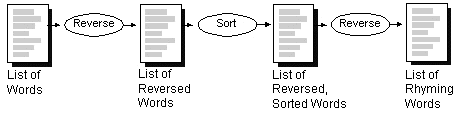
This figure has been reduced to fit on the page.
Click the image to view it at its natural size.
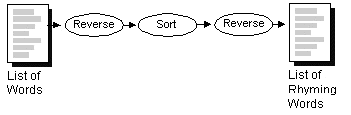
PipedReader and PipedWriter
to connect the input and output of its reverse
and sort methods in
order to create a list of rhyming words. Several classes make up this
program. This section shows and discusses only the elements of the
program that read from and write to the pipes. Follow the code
links presented here to see the whole program.
First, let's look at the calling sequence of the reverse
and sort methods from the main method
in the
RhymingWords
class:
FileReader words = new FileReader("words.txt");
Reader rhymingWords = reverse(sort(reverse(words)));
reverse takes a
FileReader opened on the file
words.txt that
contains a list of words. The return value of reverse is
passed to sort, whose return value is then passed to
another call to reverse.
Let's look at the reverse method; the sort
method is similar and you will understand it once you understand
reverse.
public static Reader reverse(Reader source) {
    BufferedReader in = new BufferedReader(source);

    PipedWriter pipeOut = new PipedWriter();
    PipedReader pipeIn = new PipedReader(pipeOut);
    PrintWriter out = new PrintWriter(pipeOut);

    new ReverseThread(out, in).start();

    return pipeIn;
}
reverse create both ends of a
pipe--a PipedWriter and a PipedReader--
and connects them by constructing
the PipedReader "on" the PipedWriter.
Whatever's written to the
PipedWriter can be read from the PipedReader.
The connection forms a
pipe, as illustrated here:

reverse starts a
ReverseThread
that writes its output to the PipedWriter
and then returns the PipedReader to the caller.
The caller then arranges for a sorting thread to read from it.
The sort method is exactly the same,
except that it creates and starts a
SortThread.
Using Streams to Wrap Other Streams
Thereversemethod contains some other interesting code; in particular, these two statements:The first line opens aBufferedReader in = new BufferedReader(source); ... PrintWriter out = new PrintWriter(pipeOut);BufferedReaderonsource, the argument to reverse (aReader). This essentially "wraps"sourcein aBufferedReader. The program reads from theBufferedReader, which in turn reads fromsource. The program does this so that it can useBufferedReader's convenientreadLinemethod. Similarly, thePipedWriteris wrapped in aPrintWriterso that the program can usePrintWriter's convenientprintlnmethod. You will often see streams wrapped in this way so as to combine the various features of the many streams.
Try this: Write another version of this program that uses input streams and output streams in place of readers and writers. See for the solution.
|
|
Start of Tutorial > Start of Trail > Start of Lesson | Lesson Contents |