


 |
Start of Tutorial > Start of Trail > Start of Lesson | Lesson Contents |

|
Trail: Essential Java Classes |
|
Lesson: Accessing System Resources |
|
Help
on searching
Search technology |
Miscellaneous System Methods
TheSystem class provides several methods that provide miscellaneous
functionality including copying arrays and getting the current time.
Copying Arrays
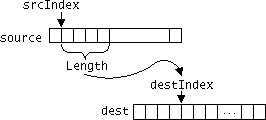
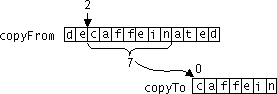
UseSystem'sarraycopymethod to efficiently copy data from one array into another. Thearraycopymethod requires five arguments:The twopublic static void arraycopy(Object source, int srcIndex, Object dest, int destIndex, int length,Objectarguments indicate the array to copy from and the array to copy to. The three integer arguments indicate the starting location in each the source and the destination array, and the number of elements to copy. This diagram illustrates how the copy takes place:The following program uses arraycopyto copy some elements from thecopyFromarray to thecopyToarray.Thepublic class ArrayCopyTest { public static void main(String[] args) { char[] copyFrom = { 'd', 'e', 'c', 'a', 'f', 'f', 'e', 'i', 'n', 'a', 't', 'e', 'd' }; char[] copyTo = new char[7]; System.arraycopy(copyFrom, 2, copyTo, 0, 7); System.out.println(new String(copyTo)); } }arraycopymethod call in this example program begins the copy at element number 2 in the source array. Recall that array indices start at 0, so that the copy begins at the array element 'c'. Thearraycopymethod call puts the copied elements into the destination array beginning at the first element (element 0) in the destination arraycopyTo. The copy copies 7 elements: 'c', 'a', 'f', 'f', 'e', 'i', and 'n'. Effectively, thearraycopymethod takes the "caffein" out of "decaffeinated", like this:Note that the destination array must be allocated before you call arraycopyand must be large enough to contain the data being copied.
Getting the Current Time
ThecurrentTimeMillismethod returns the current time in milliseconds since 00:00:00, January 1, 1970. ThecurrentTimeMillismethod is commonly used during performance tests: get the current time, perform the operation that you want to time, get the current time again--the difference in the two time samples is roughly the amount of time that the operation took to perform.Often in graphical user interfaces the time difference between mouse clicks is used to determine whether a user double clicked. The following applet uses
currentTimeMillisto compute the number of milliseconds between two mouse clicks. If the time period between the clicks is smaller than 200 milliseconds, the two mouse clicks are interpreted as a double mouse click.
Here's the source for the
Note: Because some old browsers don't support 1.1, the above applet is a 1.0 version (here is the 1.0 code; here's the 1.1 code). To run the 1.1 version of the applet, go toexample-1dot1/TimingIsEverything.html. For more information about running applets, refer to About Our Examples.TimingIsEverythingapplet:import java.awt.Graphics; import java.awt.Dimension; import java.awt.event.MouseAdapter; import java.awt.event.MouseEvent; public class TimingIsEverything extends java.applet.Applet { public long firstClickTime = 0; public String displayStr; public void init() { displayStr = "Double Click Me"; addMouseListener(new MyAdapter()); } public void paint(Graphics g) { g.drawRect(0, 0, getSize().width-1, getSize().height-1); g.drawString(displayStr, 40, 30); } class MyAdapter extends MouseAdapter { public void mouseClicked(MouseEvent evt) { long clickTime = System.currentTimeMillis(); long clickInterval = clickTime - firstClickTime; if (clickInterval < 200) { displayStr = "Double Click!! (Interval = " + clickInterval + ")"; firstClickTime = 0; } else { displayStr = "Single Click!!"; firstClickTime = clickTime; } repaint(); } } }You could use the return value from this method to compute the current date and time. However, you'll probably find that it's more convenient to get the current date and time from the
Dateclass.
Note: Previous versions of theSystemclass support two other time-related methods besides thecurrentTimeMillismethod:currentTimeandnowMillis. These two methods are now obsolete--you should usecurrentTimeMillisinstead.
Exiting the Runtime Environment
To exit the Java interpreter, call theSystem.exitmethod. The interpreter exits with the integer exit code that you specify to theexitmethod.Note: TheSystem.exit(-1);exitmethod causes the Java interpreter to exit, not just your Java program. Use this function with caution.
Security consideration: Invocation of theexitmethod is subject to security restrictions. Depending on the browser that an applet is running in, a call toexitfrom within an applet will likely result in aSecurityException. See Security Restrictionsfor information about the security restrictions placed on applets.
Setting and Getting the Security Manager
The security manager is an object that enforces a certain security policy for a Java application. You can set the current security manager for your applications usingSystem'ssetSecurityManagermethod, and you can retrieve the current security manager usingSystem'sgetSecurityManagermethod. An application's security manager is ajava.lang.SecurityManagerProviding Your Own Security Manager discusses security managers in detail and shows you how to create and install your own security manager using these two
Systemmethods.
Security consideration: The security manager for an application can be set only once. Typically, a browser sets its security manager during its startup procedure. Thus, most of the time, applets cannot set the security manager because it's already been set. ASecurityExceptionwill result if your applet attempts to do so. See Security Restrictions
|
|
Start of Tutorial > Start of Trail > Start of Lesson | Lesson Contents |