


 |
Start of Tutorial > Start of Trail > Start of Lesson | Lesson Contents |

|
Trail: Learning the Java Language |
|
Lesson: Objects and Classes in Java |
|
Help
on searching
Search technology |
A Brief Introduction to Classes
Following is the code for a class calledSimplePoint
that represents a point in 2D space:
public class SimplePoint {
    public int x = 0;
    public int y = 0;
}
SimplePoint.
The SimplePoint class
contains two integer member variables,
x and y.
The public keyword preceding the declaration
for x and y means that
any other class can freely access these two members.
You create an object from a class such as SimplePoint
by instantiating the class.
When you create a new SimplePoint object
(we show you how shortly),
space is allocated for the object
and its members x and y.
In addition, the x and y members
inside the object are initialized to 0
because of the assignment statements
in the declarations of these two members.
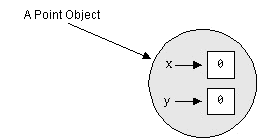
SimpleRectangle,
that represents a rectangle in 2D space:
public class SimpleRectangle {
    public int width = 0;
    public int height = 0;
    public SimplePoint origin = new SimplePoint();
}
SimpleRectangle--
that contains two integer members,
width and height.
SimpleRectangle also contains a third member,
origin, whose data type is SimplePoint.
Notice that the class name SimplePoint
is used in a variable declaration as the variable's type.
You can use the name of a class anywhere
you can use the name of a primitive type.
Just as width "is an" integer
and height "is an" integer,
origin "is a" SimplePoint.
On the other hand, a SimpleRectangle object
"has a" SimplePoint.
The distinction between "is a" and "has a" is critical
because only an object that "is a" SimplePoint
can be used where a SimplePoint is called for.
As with SimplePoint,
when you create a new SimpleRectangle object,
space is allocated for the object and its members,
and the members are initialized according to their declarations.
Interestingly, the initialization for the origin member
creates a SimplePoint object with this code:
new SimplePoint() as illustrated here:
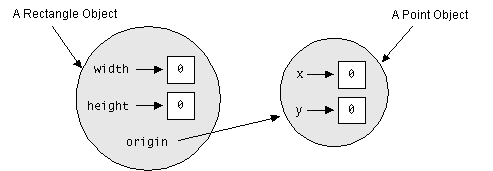
This figure has been reduced to fit on the page.
Click the image to view it at its natural size.
width and height
are integers and are fully contained within SimpleRectangle.
On the other hand,
origin simply references a SimplePoint object
somewhere else.
The SimplePoint and SimpleRectangle classes
as shown are simplistic implementations for these classes.
Both should provide a mechanism
for initializing their members to values other than 0.
Additionally, SimpleRectangle could provide a method
for computing its area,
and because SimpleRectangle creates a SimplePoint
when it's created,
the class should provide for the clean up
of the SimplePoint
when SimpleRectangle gets cleaned up.
So, here's a new version of SimplePoint, called
Point,
that contains a constructor
which you can use to initialize a new Point
to a value other than (0,0):
public class Point {
    public int x = 0;
    public int y = 0;
	// a constructor!
    public Point(int x, int y) {
	this.x = x;
	this.y = y;
    }
}
Point,
you can provide initial values for it like this:
The values 44 and 78 are passed into the constructor and subsequently assigned to thenew Point(44, 78)
x and y
members of the new Point object as shown here:
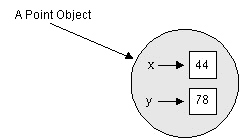
SimpleRectangle class.
Here's a new version of SimpleRectangle,
called Rectangle, that contains four constructors,
a method to "move" the rectangle,
a method to compute the area of the rectangle,
and a finalize method to provide for clean up:
public class Rectangle {
    public int width = 0;
    public int height = 0;
    public Point origin;
	// four constructors
    public Rectangle() {
	origin = new Point(0, 0);
    }
    public Rectangle(Point p) {
	origin = p;
    }
    public Rectangle(int w, int h) {
	this(new Point(0, 0), w, h);
    }
    public Rectangle(Point p, int w, int h) {
	origin = p;
	width = w;
	height = h;
    }
	// a method for moving the rectangle
    public void move(int x, int y) {
	origin.x = x;
	origin.y = y;
    }
	// a method for computing the area of the rectangle
    public int area() {
	return width * height;
    }
	// clean up!
    protected void finalize() throws Throwable {
	origin = null;
	super.finalize();
    }
}
Rectangle
and let it provide default values for everything,
or you can specify initial values for the origin,
the width and the height,
or for all three when you create the object.
You'll see more of this version of the Rectangle
class in the next section.
This section glossed over some details and left some things unexplained, but it provides the basis you need to understand the rest of this lesson. After reading this section, you should know that
- objects are created from classes
- an object's class is its type
- how "is a" differs from "has a"
- the difference between reference and primitive types.
- How to create an object from a class
- What constructors are
- What the code for a class looks like
- What member variables are
- How to initialize objects
- What methods look like
|
|
Start of Tutorial > Start of Trail > Start of Lesson | Lesson Contents |