


 |
Start of Tutorial > Start of Trail > Start of Lesson | Lesson Contents |

|
Trail: Learning the Java Language |
|
Lesson: The Nuts and Bolts of the Java Language |
|
Help
on searching
Search technology |
Variables and Data Types
Variables are the nouns of a programming language-that is, they are the entities (values and data) that act or are acted upon. ThecountChars method defines two variables--
count and in.
The program increments count each time it reads
a character from the other variable in.
The declarations for both variables appear in bold in the following listing:
import java.io.*;
public class Count {
    public static void countChars(Reader in) throws IOException
    {
        int count = 0;

        while (in.read() != -1)
            count++;
        System.out.println("Counted " + count + " chars.");
    }
    // ... main method omitted ...
}
Data Types
All variables in the Java language must have a data type. A variable's data type determines the values that the variable can contain and the operations that can be performed on it. For example, the declarationint countdeclares thatcountis an integer (int). Integers can contain only integral values (both positive and negative), and you can use the standard arithmetic operators (+,-,*, and/) on integers to perform the standard arithmetic operations (addition, subtraction, multiplication, and division, respectively).There are two major categories of data types in the Java language: primitive and reference. The following table lists, by keyword, all of the primitive data types supported by Java, their sizes and formats, and a brief description of each.
Type Size/Format Description (integers) byte8-bit two's complement Byte-length integer short16-bit two's complement Short integer int32-bit two's complement Integer long64-bit two's complement Long integer (real numbers) float32-bit IEEE 754 Single-precision floating point double64-bit IEEE 754 Double-precision floating point (other types) char16-bit Unicode character A single character booleantrue or false A boolean value ( trueorfalse)
Purity Tip: In other languages, the format and size of primitive data types may depend on the platform on which a program is running. In contrast, the Java language specifies the size and format of its primitive data types. Hence, you don't have to worry about system-dependencies.A variable of primitive type contains a single value of the appropriate size and format for its type: a number, character, or boolean value. For example, the value of an
intis an integer, the value of acharis a 16-bit Unicode character, and so on. The value of thecountvariable incountCharsranges from its initial value of zero to a number that represents the number of characters in the input.Arrays, classes, and interfaces are reference types. The value of a reference type variable, in contrast to that of a primitive type, is a reference to the actual value or set of values represented by the variable. A reference is like your friend's address: The address is not your friend, but it's a way to reach your friend. A reference type variable is not the array or object itself but rather a way to reach it.
The
countCharsmethod uses one variable of reference type,in, which is aReaderobject. When used in a statement or expression, the nameinevaluates to a reference to the object. So you can use the object's name to access its member variables or call its methods (just ascountCharsdoes to callread).
Note to C and C++ Programmers: There are three C Data Types Not Supported By the Java Language. They are pointer, struct, and union. These data types are not necessary in Java; you use classes and objects instead.
Variable Names
A program refers to a variable's value by its name. For example, when thecountCharsmethod wants to refer to the value of thecountvariable, it simply uses the namecount.In Java, the following must hold true for a variable name
- It must be a legal Java identifier comprised of a series of Unicode characters. Unicode is a character-coding system designed to support text written in diverse human languages. It allows for the codification of up to 65,536 characters, currently 34,168 have been assigned. This allows you to use characters in your Java programs from various alphabets, such as Japanese, Greek, Cyrillic, and Hebrew. This is important so that programmers can write code that is meaningful in their native languages.
- It must not be a keyword or a boolean literal (
trueorfalse).- It must not have the same name as another variable whose declaration appears in the same scope.
By Convention: Variable names begin with a lowercase letter and class names begin with an uppercase letter. If a variable name consists of more than one word, such as isVisible, the words are joined together and each word after the first begins with an uppercase letter.Rule #3 implies that variables may have the same name as another variable whose declaration appears in a different scope. This is true. In addition, in some situations, a variable may share names with another variable which is declared in a nested scope. Scope is covered in the next section.
Scope
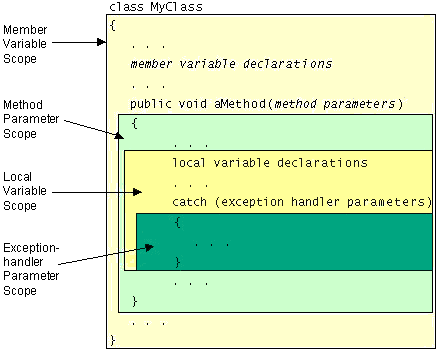
A variable's scope is the block of code within which the variable is accessible and determines when the variable is created and destroyed. The location of the variable declaration within your program establishes its scope and places it into one of these four categories:
- Member variable
- Local variable
- Method parameter
- Exception-handler parameter
A member variable is a member of a class or an object. It can be declared anywhere in a class but not in a method. The member is available to all code in the class. The Countclass declares no member variables. For information about declaring member variables, refer to Declaring Member Variablesin the next lesson.
You can declare local variables anywhere in a method or within a block of code in a method. In
countChars,countis a local variable. The scope ofcount, that is, the code that can accesscount, extends from the declaration ofcountto the end of thecountCharsmethod (indicated by the first right curly bracket}that appears in the program code). In general, a local variable is accessible from its declaration to the end of the code block in which it was declared.Method parameters are formal arguments to methods and constructors and are used to pass values into methods. The discussion about writing methods in the next lesson, Implementing Methods
countChars,inis a parameter to thecountCharsmethod. The scope of a method parameter is the entire method for which it is a parameter. So, incountChars, the scope ofinis the entirecountCharsmethod.Exception-handler parameters are similar to method parameters but are arguments to an exception handler rather than to a method or a constructor. The
countCharsmethod does not have any exception handlers, so it doesn't have any exception-handler parameters. Handling Errors with Exceptions
Variable Initialization
Local variables and member variables can be initialized with an assignment statement when they're declared. The data type of both sides of the assignment statement must match. ThecountCharsmethod provides an initial value of zero forcountwhen declaring it:The value assigned to the variable must match the variable's type.int count = 0;Method parameters and exception-handler parameters cannot be initialized in this way. The value for a parameter is set by the caller.
Final Variables
You can declare a variable in any scope to be final, including parameters to methods and constructors. The value of a final variable cannot change after it has been initialized.To declare a final variable, use the
finalkeyword in the variable declaration before the type:The previous statement declares a final variable and initializes it, all at once. Subsequent attempts to assign a value tofinal int aFinalVar = 0;aFinalVarresult in a compiler error. You may, if necessary, defer initialization of a final variable. Simply declare the variable and initialize it later, like this:A final variable that has been declared but not yet initialized is called a blank final. Again, once a final variable has been initialized it cannot be set and any later attempts to assign a value tofinal int blankfinal; . . . blankfinal = 0;blankfinalresult in a compile-time error.
|
|
Start of Tutorial > Start of Trail > Start of Lesson | Lesson Contents |