


 |
Start of Tutorial > Start of Trail | Lesson Contents |

|
Trail: Java Native Interface |
|
Help
on searching
Search technology |
Compiling and Running a Java Program with a Native Method
This lesson walks you through the steps necessary to integrate native code with programs written in Java.
This lesson implements the canonical "Hello World!"
program. The "Hello World!" program has one Java class, called HelloWorld. HelloWorld.java does two things: it declares a native method that displays "Hello World!" and it implements the main method for
the overall program. The implementation
for the native method is provided in C.
Note : This lesson assumes that you are starting with neither existing C functions nor Java classes. While "in the real world" you probably have existing C functions that you wish to integrate with Java programs, you will still need to modify the signatures for these C functions to work with the JNI. To be sure that you use the correct signatures, it is best to begin by writing and compiling the Java code, as described here.
Background
Writing native methods for Java programs is a multi-step process.
-
Begin by writing the Java program. Create a Java class that
declares the native method; this class contains the declaration or signature for the native
method. It also includes a
mainmethod which calls the native method. - Compile the Java class that declares the native method and the
mainmethod. - Generate a header file for the native method using
javahwith the native interface flag-jni. Once you've generated the header file you have the formal signature for your native method. - Write the implementation of the native method in the programming language of your choice, such as C or C++.
- Compile the header and implementation files into a shared library file.
- Run the Java program.
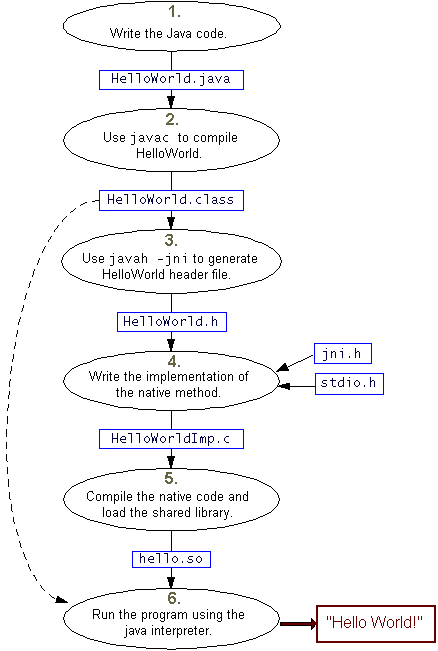
The following figure illustrates these steps for the Hello World program:
Step 1: Write the Java Code
Create a Java class namedHelloWorldthat declares a native method. This class also includes amainmethod that creates aHelloWorldobject and calls the native method.
Step 2: Compile the Java Code
Use javac to compile the Java code that you wrote in Step 1.
Step 3: Create the .h File
Usejavahto create a JNI-style header file (a.hfile) from theHelloWorldclass. The header file provides a function signature for the implementation of the native methoddisplayHelloWorld.
Step 4: Write the Native Method Implementation
Write the implementation for the native method in a native language (such as ANSI C) source file. The implementation will be a regular function that's integrated with your Java class.
Step 5: Create a Shared Library
Use the C compiler to compile the.hfile and the.cfile that you created in Steps 3 and 4 into a shared library. In Windows 95/NT terminology, a shared library is called a dynamically loadable library (DLL).
Step 6: Run the Program
And finally, use java, the Java interpreter, to run the program.
|
|
Start of Tutorial > Start of Trail | Lesson Contents |