


 |
Start of Tutorial > Start of Trail > Start of Lesson | Lesson Contents |

|
Trail: Custom Networking |
|
Lesson: All About Sockets |
|
Help
on searching
Search technology |
What Is a Socket?
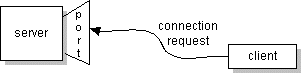
Normally, a server runs on a specific computer and has a socket that is bound to a specific port number. The server just waits, listening to the socket for a client to make a connection request.On the client-side: The client knows the hostname of the machine on which the server is running and the port number to which the server is connected. To make a connection request, the client tries to rendezvous with the server on the server's machine and port.
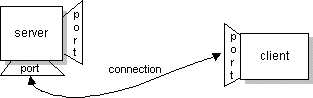
The client and server can now communicate by writing to or reading from their sockets.
Definition: A socket is one endpoint of a two-way communication link between two programs running on the network. A socket is bound to a port number so that the TCP layer can identify the application that data is destined to be sent.
The java.net package in the Java platform provides a
class, Socket, that implements one side of a two-way
connection between your Java program and another program on the
network. The Socket class sits on top of a
platform-dependent implementation, hiding the details of any particular
system from your Java program. By using the
java.net.Socket class instead of relying on native code,
your Java programs can communicate over the network in a
platform-independent fashion.
Additionally, java.net includes the
ServerSocket class, which implements a socket that servers
can use to listen for and accept connections to clients. This lesson
shows you how to use the Socket and
ServerSocket classes.
If you are trying to connect to the Web, the URL class and related
classes (URLConnection, URLEncoder)
are probably more appropriate than
the socket classes. In fact, URLs are a relatively high-level
connection to the Web and use sockets as part of the underlying
implementation. See
Working with URLs
for information about
connecting to the Web via URLs.
|
|
Start of Tutorial > Start of Trail > Start of Lesson | Lesson Contents |