


 |
Start of Tutorial > Start of Trail > Start of Lesson | Lesson Contents |

|
Trail: Security in JDK 1.2 |
|
Lesson: Signing Code and Granting It Permissions |
|
Help
on searching
Search technology |
Steps for the Code Receiver
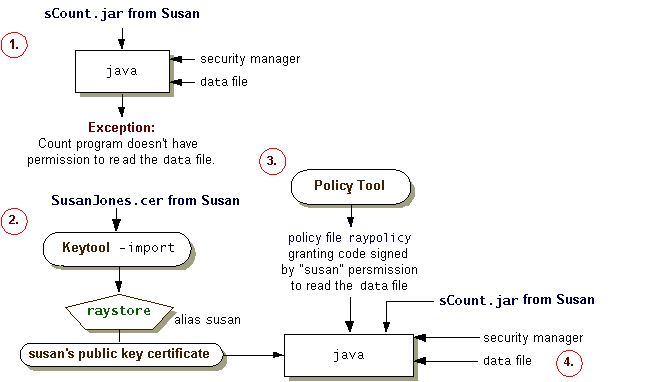
Now act as Ray, who receives the signed JAR file and the certificate file from Susan. You will perform the following steps, as shown in the figure.
- Observe the Restricted Application
- Import the Certificate as a Trusted Certificate,
using the
keytool -importcommand, and give it the aliassusan. - Set Up a Policy File
to Grant the Required Permission to
permit classes signed by
susanto read the specified file. - See the Policy File Effects, that is, see how the application can now read the file.
This figure has been reduced to fit on the page.
Click the image to view it at its natural size.
|
|
Start of Tutorial > Start of Trail > Start of Lesson | Lesson Contents |