


 |
Start of Tutorial > Start of Trail > Start of Lesson | Lesson Contents |

|
Trail: Sound |
|
Lesson: Sound |
|
Help
on searching
Search technology |
Playing Sounds
With JDK 1.2 you can play many different types of audio files from both applets and applications. This lesson contains three sections that show you how.Playing Sounds from an Applet
The mechanism for playing sounds from an applet is unchanged in JDK 1.2. To play a sound file, you can load the clip by usingApplet.getAudioClipand control playback through theAudioClipplay,loop, andstopmethods. For example, to play a WAV file from an applet, you couldThe audio data is loaded when the
- Call
Applet.getAudioclip and pass in the URL where the.wavfile is located.- Call
playorloopon theAudioClip.AudioClipis constructed. It is not loaded asynchronously.You can also use
Applet.playto play any of the supported types of audio files. However, when you useApplet.play, the audio data is not preloaded. The first time the user initiates playback of a particular sound, your applet's drawing and event handling will freeze while the audio data is loaded.Example: SoundApplet
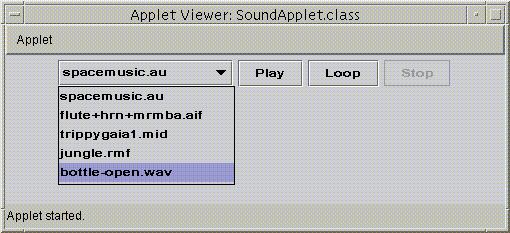
The applet shown below plays several types of audio clips: an AU file, an AIFF file, a WAV file, and a MIDI file. (The AIFF and WAV files used in the examples for this trail were provided by Headspace, Inc.)
This is a picture of the applet's GUI. To run the applet, click the picture. The applet will appear in a new browser window.
Note: If you're behind a firewall, the SoundApplet sample might not play the sounds if you run it by clicking on the picture above. Some versions of Java Plugin cannot access the sound files from a JAR file. To run the applet, you can download all of the necessary files to your machine and run it locally without using a JAR file.Regardless of the type of sound file used, the code for loading and playing the file is the same. This example provides a framework for loading and playing multiple audio clips and loads the audio clips asynchronously, but the code for loading and playing the clips essentially boils down to
This applet stops playing a looping sound when the user leaves the page and resumes playback when the user comes back. This is done through the applet'sAudioClip onceClip, loopClip; onceClip = soundList.getClip(chosenFile); loopClip = soundList.getClip(chosenFile); AudioClip audioClip = Applet.getAudioClip(baseURL, relativeURL); onceClip.play(); //Play it once. loopClip.loop(); //Start the sound loop. loopClip.stop(); //Stop the sound loop.startandstopmethods.public void stop() { onceClip.stop(); //Cut short the one-time sound. if (looping) { loopClip.stop(); //Stop the sound loop. } } public void start() { if (looping) { loopClip.loop(); //Restart the sound loop. } }To reduce the amount of time that the user has to wait before interacting with the applet, the sounds are preloaded in a background thread instead of in the applet's
initmethod. If the user initiates playback before a sound has finished loading, the applet can respond appropriately. The loading of the sounds is done in theSoundLoaderrunmethod.public void run() { AudioClip audioClip = Applet.getAudioClip(baseURL, relativeURL); soundList.putClip(audioClip, relativeURL); }You can find the complete code for this program in
SoundApplet.java. To run this applet, you will also need the filesAppletSoundList.javaandAppletSoundLoader.java, and the following sound files:
Playing Sounds from an Application
In JDK 1.2, applications as well as applets can play sounds. A new static method has been added tojava.applet.Appletto enable applications to createAudioClipsfrom a URL.To play a sound from an applet, you callpublic static final AudioClip newAudioClip(URL r)Applet.newAudioClipto load the sound and then use theAudioClipplay,loop, andstopmethods to control playback. For example, to play a WAV file from an application, you could
- Call
Applet.newAudioClipand pass in the URL where the.wavfile is located.- Call
playorloopon theAudioClip.Example: SoundApplication
The sound player in the previous example can easily be implemented as an application. The main difference is thatApplet.newAudioClipis called to load the sounds.You can find the complete code for this application inAudioClip onceClip, loopClip; onceClip = soundList.getClip(chosenFile); loopClip = soundList.getClip(chosenFile); AudioClip audioClip = Applet.newAudioClip(completeURL);SoundApplication.java. To run this application, you will also need the filesSoundList.javaandSoundLoader.java, and the following sound files:
Common Problems (and Their Solutions)
Here are solutions to two of the most common problems you might encounter when playing audio files.
- Problem: 8 kHz audio files do not sound as good as they did before I switched to JDK 1.2.
- Solution: The Java Sound engine up-samples 8 kHz audio data to 22 kHz, which can result in added noise during playback. If you find that the audio quality is not acceptable, start with a higher-quality audio clip to avoid the up-sampling.
- Problem: Some of my audio files won't play.
- Solution: You cannot play WAV, AU, AIFF, or AU files compressed using ADPCM or other compression schemes. The Java Sound engine supports only linear PCM audio files.
|
|
Start of Tutorial > Start of Trail > Start of Lesson | Lesson Contents |