


 |
Start of Tutorial > Start of Trail > Start of Lesson | Lesson Contents |

|
Trail: Putting It All Together |
|
Lesson: BINGO! |
|
Help
on searching
Search technology |
Broadcasting Game Information
The Game sends three kinds of information to the Players:- BINGO balls
- Player status updates (such as when a new player registers or when a player cries wolf)
- Game status updates (such as when the game is about to begin, when the game is over, and so on)
 and
All About Datagrams.
To broadcast a tidbit of information to the Players, the Game
creates a DatagramPacket containing the information
encoded in a byte array.
The Game addresses the packet with a destination port number
and a group identifier specified by a class D Internet address.
The port number is an arbitrarily chosen number that the Player
and Game have agreed to use.
The group identifier simply identifies what type of information
is contained in the packet.
The Game uses three different group identifiers each of which
identifies one of the three kinds of information sent by the Game.
Thus ball packets are marked with the BallListeningGroup
identifier, the player status packets are marked with
the PlayerListenerGroup identifier,
and the game status packets are
marked with the GameListenerGroup identifier.
To receive information broadcast by the Game, the Player
opens a MulticastSocket on the same port number
used by the Game to create its DatagramPacket.
Next the Player asks the MulticastSocket
to join one of the groups that the Game used to
create its DatagramPacket.
That MulticastSocket will only receive packets destined
for that port and marked with that group identifier.
If the Player wants information for a different group,
it must create a different MulticastSocket
and have it join a different group.
Using UDP in this way, the Game can broadcast information to all the Players simultaneously and uses only one port for all of its status updates. Additionally, through the use of group identifiers, the Game can identify the different kinds of information thereby allowing the Player application to receive only the information that it wants.
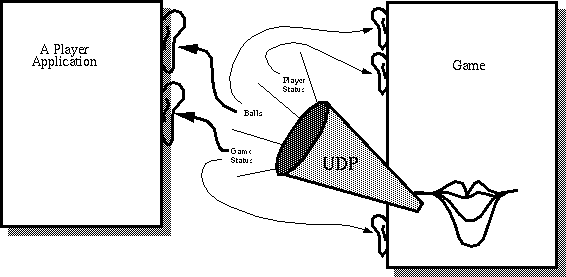
This figure has been reduced to fit on the page.
Click the image to view it at its natural size.
As the diagram implies, one interesting side-effect of broadcasting information to the Players is that the Game can listen to the information, too. This particular side-effect was used to advantage to design the various status panes to operate independently of the Game. Instead of having the Game directly update the status panes within its code, the status panes update themselves by listening to the broadcast information. Thus the status panes can be shared by the Player application (or any other application) as well. You can read more about this in [PENDING].
How the Game Broadcasts Information
TheSocketGateclass, as its name implies, is the gate through which all information is broadcast from the Game application.The Game application creates and uses one instance of
SocketGatefor the entire program. TheRingMastercreates theSocketGatein its constructor:The constructor forsocketGate = new SocketGate();SocketGatecreates aMulticastSocketthrough which the Game sendsDatagramPackets. Additionally, the constructor creates threeInetAddress's. These are the group identifiers for the game. There is one group identifier for each type of information broadcast from the Game: balls, player status, and game status.The argument to the constructor for theSocketGate () throws java.io.IOException { socket = new MulticastSocket(Constants.portNumber); ballListeningGroup = InetAddress.getByName(Constants.BallListeningGroup); playerListeningGroup = InetAddress.getByName(Constants.PlayerListeningGroup); gameListeningGroup = InetAddress.getByName(Constants.GameListeningGroup); }MulticastSocket,Constants.portNumber, is the port to which the socket is bound. The actual port number doesn't matter except that the Game and the Player agree on what it is and it's not one of the reserved port numbers between 0 and 1023. The BINGO game port number is 52596 which is Sophia's birthday (5/25/96).Group identifiers are class D Internet address which range from 224.0.0.1 and 239.255.255.255. As with the port number, the actual addresses used by the BINGO game don't matter as long as the Player and Game agree on what they are. The addresses we chose for the BINGO game are consecutive and are as follows (for no particular reason at all):
Constants.BallListeningGroupis "230.0.0.1"Constants.PlayerListeningGroupis "230.0.0.2"Constants.GameListeningGroupis "230.0.0.3"All information is broadcast from the Game via the
sendBytesmethod provided bySocketGate. Given an array of bytes and a group identifier,sendBytespackages the array into aDatagramPacketand sends it on its way.Theprivate void sendBytes(byte[] data, InetAddress group) { DatagramPacket packet = new DatagramPacket(data, data.length, group, Constants.portNumber); try { socket.send(packet); } catch (java.io.IOException e) { // PENDING: what should go in here? } }sendBytesmethod is called from each of the three convenience methods implemented bySocketGateto send each kind of information sent by the Game:The information sent in avoid sendBall(BingoBall b) { sendBytes(b.getBytes(), ballListeningGroup); } void sendPlayerStatusMessage(PlayerRecord p) { sendBytes(p.getBytes(), playerListeningGroup); } void sendGameStatusMessage(String msg) { sendBytes(msg.getBytes(), gameListeningGroup); }Datagrampacketmust be bytes, so all of the information is converted to bytes before being broadcast. The receiver must reconstruct the actual information from bytes on the other side. You'll see this in How to Receive Information Broadcast by the Game.Note that the code is a bit cavalier about converting everything to bytes. Although careless, the code works for all of the converted data except in one, unlikely, scenario.
The BINGO ball numbers always survive the conversion because they range from 1 to 75 which is small enough to fit into a byte. The game status string survives the conversion because the code calls the
getBytesmethod from theStringclass which automatically encodes Unicode characters to bytes (and back again on the other side) using the default character encoding.Potential problems occur with the player status. The player name is a
Stringand survives the conversion for the same reason that the game status string survives. However, problems may occur with the numbers in the player status--the player ID, the number of cards used by the player, and the number of wolf cries made by the player--which are all declared to be integers.By default, the game parameters limit these numbers to those that fit within a byte (player ID won't exceed 100, the number of cards won't exceed 3, and so on). However, if you change the game parameters, and allow them to exceed 255, then the numbers will not survive the conversion and will be broadcast incorrectly.
How to Receive Information Broadcast by the Game
Thebingo.sharedpackage contains three classes whose sole purpose is to just sit around and listen for packets to come across aMulticastSocket. Each class listens for packets marked with a different group identifier:All of the listening thread classes subclass the abstract superclass called
BallListenerThreadlistens for packets marked with theBallListeningGroupidentiferGameListenerThreadlistens for packets marked with theGameListeningGroupidentifierPlayerListenerThreadlistens for packets marked with thePlayerListeningGroupidentifierListenerThreadshown here:The abstract superclass provides a constructor that its subclasses must call from their constructors, a mechanism for gently stopping the thread, and apackage bingo.shared; import java.net.*; import java.io.*; public abstract class ListenerThread extends Thread { boolean stopListening = false; MulticastSocket socket; private InetAddress group; private String groupString; public ListenerThread(String groupString) throws UnknownHostException, IOException { super(); this.groupString = groupString; this.group = InetAddress.getByName(groupString); socket = new MulticastSocket(Constants.portNumber); socket.joinGroup(group); } public void stopListening() { stopListening = true; } protected void finalize() throws Throwable { socket.leaveGroup(group); socket.close(); } }finalizemethod.As you can see from the code, the constructor in
ListenerThreadcreates a group identifier based on the group string passed into the constructor. The group string is passed into the constructor by a subclass constructor. TheBallListenerThreadsubclass passes inConstants.BallListeningGroup, and so on. This is the same group used by the Game to address packets sent to theMulticastSocket.The constructor then creates a
MulticastSocketon the BINGO port, and joins a group on that socket. By joining the group this thread will only receive information for that particular group. Each ListenerThread must have its ownMulticastSocketbecause aMulticastSocketcan join only one group at a time. Thus aMulticastSocketcannot be shared for listening as it can be for broadcasting.The subclasses of
ListenerThreadeach provide their ownrunmethod which are all similar. Each loops untilstopListeningbecomestrue. During each iteration of the loop, the thread waits for a packet to come over the socket. When a packet arrives, the thread gets the information from the packet, converts it from bytes to the appropriate type, and notifies another object (its notifyee) of the event.The three subclasses of
ListenerThreadare basically the same, so let's just look at one: theBallListenerThreadclass:The constructor forpackage bingo.shared; import java.net.*; import java.io.*; public class BallListenerThread extends ListenerThread { private BallListener notifyee; public BallListenerThread(BallListener notifyee) throws IOException { super(Constants.BallListeningGroup); this.notifyee = notifyee; } public synchronized void run() { DatagramPacket packet; while (stopListening == false) { byte[] buf = new byte[256]; packet = new DatagramPacket(buf, 256); try { socket.receive(packet); byte[] rcvd = packet.getData(); BingoBall b = new BingoBall(rcvd); if (b.getNumber() == BingoBall.GAME_OVER) { notifyee.noMoreBalls(); } else notifyee.ballCalled(b); } catch (IOException e) { // PENDING: what goes in here? } } } }BallListenerThreadrequires aBallListener-- an object that implements theBallListenerinterface and thus implements two methods:ballCalledandnoMoreBalls. TheBallListenerThreadnotifies itsBallListenerwhenever a ball is called, or when the end-of-game ball arrives by calling the appropriate one of those two methods. The notifyee then takes whatever action is appropriate.
PlayerListenerThreadis similar but itsnotifyeeis aPlayerListener. Likewise,GameListenerThread'snotifyeeis aGameListener.
|
|
Start of Tutorial > Start of Trail > Start of Lesson | Lesson Contents |