


 |
Start of Tutorial > Start of Trail > Start of Lesson | Lesson Contents |

|
Trail: Putting It All Together |
|
Lesson: BINGO! |
|
Help
on searching
Search technology |
The Primary Classes
The Engine of the Game
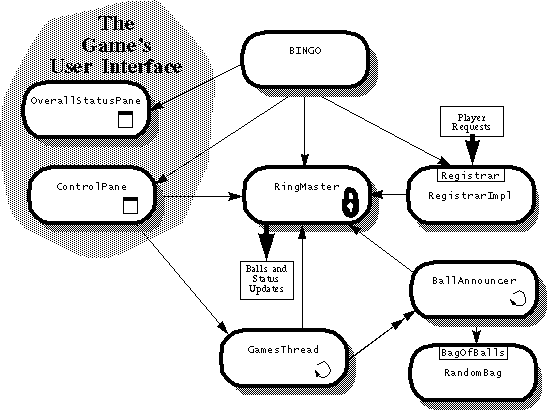
The following is a diagram of the classes that make up the Game's "engine":
This figure has been reduced to fit on the page.
Click the image to view it at its natural size.
Note: This diagram does not include all of the classes that comprise the Game application. Rather it just shows the key classes. Later pages in this lesson include other diagrams that show the some of the relationships between the other classes.
The
BINGOclass contains themainmethod for the Game application, so let's begin there.BINGOcreates aRingMasterobject. TheRingMasteris the most central object of the Game application and provides much of the code that glues everything together. TheRingMastercreates many helper objects such as theNotaryPublicfor signing BINGO cards, theRosterfor keeping track of registered players, and so on.The
mainmethod also creates three other objects: aRegistrarImplobject (which handles all RMI requests from Players), and aControlPaneand anOverallStatusPane(both of which implement parts of the Game's user interface).When the user clicks the Let the Games Begin button, the
ControlPanecreates and starts aGamesThreadwhich creates and starts a newBallAnnouncerfor each game.
The Game's User Interface
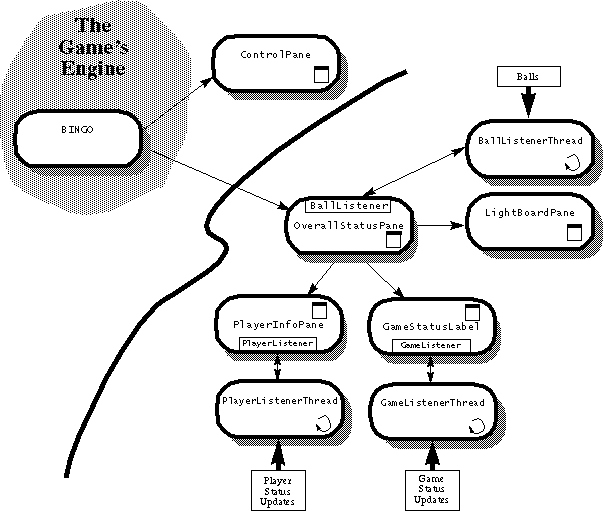
The following is a diagram of the classes that implement the Game's user interface:The classes above and to the left of the swoosh are in the
This figure has been reduced to fit on the page.
Click the image to view it at its natural size.bingo.gamepackage. The classes below and to the right of the swoosh are in thebingo.sharedpackage because they do not depend directly on any code in the Game and they can be shared by the Player (asLightBoardPaneandGameStatusLabelare).The best way to understand the classes that make up the Game's UI is to identify the areas of the user interface that each class controls. So, here's a box diagram that shows you what class controls each area of the Game's user interface:
[PENDING: put in a snapshot of the game with callouts indicating which classes control which part of the window]
Using the JFC to Implement the UI's contains similar box diagrams, but instead of showing the BINGO classes that implement each area of the user interface, they show you which Swing components are used in the GUI elements (either because the classes shown here create Swing objects or subclass the classes).
The Player
The following is a diagram of the classes that make up the Player application:[PENDING]
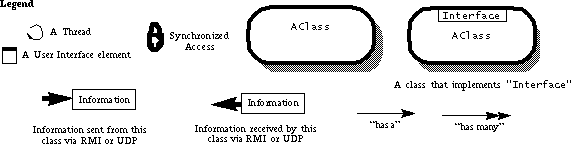
A Legend of the Symbols Used in the Diagrams
This figure has been reduced to fit on the page.
Click the image to view it at its natural size.
|
|
Start of Tutorial > Start of Trail > Start of Lesson | Lesson Contents |