


 |
Start of Tutorial > Start of Trail > Start of Lesson | Lesson Contents |

|
Trail: Creating a GUI with JFC/Swing |
|
Lesson: Working with Graphics |
|
Help
on searching
Search technology |
Moving an Image Across the Screen
This page features an example applet that moves one image (a rocketship) in front of a background image (a field of stars). You could implement this in one of two ways -- either using one label per image, or using one custom component that paints both images. Because this lesson features painting, this section features the custom component approach, as implemented inMovingImageTimer.java.
Note: You can also see an alternate implementation, which uses labels and a layered pane. You can find it inMovingLabels.java, which you can run by visitingMovingLabels.html.
Below are the two images this applet uses.
rocketship.gif:

starfield.gif:
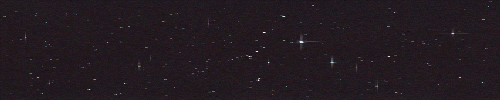
This figure has been reduced to fit on the page.
Click the image to view it at its natural size.
Here's a picture of the applet's GUI. Remember that you can click on the applet to stop or start the animation.

This is a picture of the applet's GUI. To run the applet, click the picture. The applet will appear in a new browser window.
Note: The rocketship image has a transparent background. The transparent background makes the rocketship image appear to have a rocketship shape, no matter what color background it's painted on top of. If the rocketship background weren't transparent, then instead of the illusion of a rocketship moving through space, you'd see a rocketship on top of a rectangle moving through space.
The code for performing this animation isn't complex.
Essentially, it's a copy of the animation template
that, instead of using a label to perform animation,
uses a custom component.
The custom component is a JPanel subclass
that paints two images,
one of which has a position that depends
on the current frame number.
Here is the code that paints the custom component:
...//Where the images are initialized:
Image background = getImage(getCodeBase(),
                            "images/rocketship.gif");
Image foreground = getImage(getCodeBase(),
                            "images/starfield.gif");
...
public void paintComponent(Graphics g) {
    super.paintComponent(g); //paint any space not covered
                             //by the background image
    int compWidth = getWidth();
    int compHeight = getHeight();

    //If we have a valid width and height for the
    //background image, paint it.
    imageWidth = background.getWidth(this);
    imageHeight = background.getHeight(this);
    if ((imageWidth > 0) && (imageHeight > 0)) {
        g.drawImage(background,
                    (compWidth - imageWidth)/2,
                    (compHeight - imageHeight)/2, this);
    }

    //If we have a valid width and height for the
    //foreground image, paint it.
    imageWidth = foreground.getWidth(this);
    imageHeight = foreground.getHeight(this);
    if ((imageWidth > 0) && (imageHeight > 0)) {
        g.drawImage(foreground,
                    ((frameNumber*5)
                      % (imageWidth + compWidth))
                      - imageWidth,
                    (compHeight - imageHeight)/2,
                    this);
    }
}
You could solve the first problem by delaying all painting until both images are fully loaded. The second problem could be solved by scaling the background image to fit the entire applet area. You'll learn how to wait for images to be fully loaded in Improving the Appearance and Performance of Image Animation, later in this lesson. Scaling is described in Displaying Images.
|
|
Start of Tutorial > Start of Trail > Start of Lesson | Lesson Contents |