


 |
Start of Tutorial > Start of Trail > Start of Lesson | Lesson Contents |

|
Trail: 2D Graphics |
|
Lesson: Displaying Graphics with Graphics2D |
|
Help
on searching
Search technology |
Supporting User Interaction
To allow the user to interact with the graphics you display, you need to be able to determine when the user clicks on one of them. TheGraphics2D hit method provides a way for you
to easily determine whether a mouse click occurred over a particular
Shape. Alternatively you can get the location of the mouse
click and call contains on the Shape to
determine whether the click was within the bounds of the
Shape.
If you are using primitive text, you can perform simple hit testing by
getting the outline Shape that corresponds to the text and
then calling hit or contains with that
Shape. Supporting text editing requires much more
sophisticated hit testing. If you want to allow the user to edit text,
you should generally use one of the Swing editable text components. If
you are working with primitive text and are using
TextLayout to manage the shaping and positioning of the
text, you can also use TextLayout to perform hit testing
for text editing. For more information see the chapter Text and Fonts
in the
Java 2D Programmer's Guide or see the HitTestSample example below, which
uses a TextLayout to perform simple hit-testing.
Example: ShapeMover
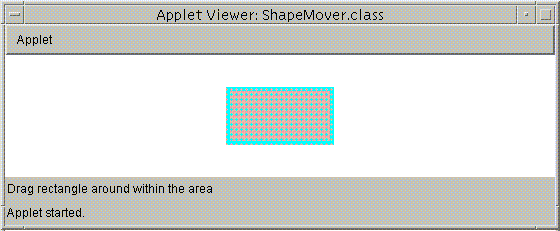
This applet allows the user to drag aShapearound within the applet window. TheShapeis redrawn at every mouse location to provide feedback as the user drags it.
This figure has been reduced to fit on the page.
Click the image to view it at its natural size.The
containsmethod is called to determine whether the cursor is within the bounds of the rectangle when the mouse is pressed. If it is, the location of the rectangle is updated.public void mousePressed(MouseEvent e){ last_x = rect.x - e.getX(); last_y = rect.y - e.getY(); if(rect.contains(e.getX(), e.getY())) updateLocation(e); ... public void updateLocation(MouseEvent e){ rect.setLocation(last_x + e.getX(), last_y + e.getY()); ... repaint();You can see the complete code for this program in
ShapeMover.javaandShapeMover.htmlincludes the applet.You might notice that redrawing the
Shapeat every mouse location is slow, because the filled rectangle is rerendered every time it is moved. Using double buffering can eliminate this problem. If you use Swing, the drawing will be double buffered automatically; you don't have to change the rendering code at all. The code for a Swing version of this program isSwingShapeMover.javaand an HTML file that includes the applet is here:SwingShapeMover.html.If you're not using Swing, the Example: BufferedShapeMover section in the next lesson shows how you can implement double buffering by using a
BufferedImage. You render into theBufferedImageand then copy the image to the screen.
Example: HitTestSample
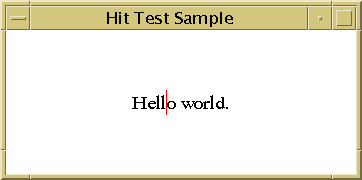
This application illustrates hit testing by drawing the default caret wherever the user clicks on theTextLayout, as shown in the following figure.The
mouseClickedmethod usesTextLayout.hitTestCharto return ajava.awt.font.TextHitInfoobject that contains the mouse click location (the insertion index) in theTextLayoutobject.Information returned by the
TextLayoutgetAscent,getDescent, andgetAdvancemethods is used to compute the location of the origin for theTextLayoutobject so it is horizontally and vertically centered.
...

private Point2D computeLayoutOrigin() {
  Dimension size = getPreferredSize();
  Point2D.Float origin = new Point2D.Float();

  origin.x = (float) (size.width - textLayout.getAdvance()) / 2;
  origin.y =
    (float) (size.height - textLayout.getDescent() + textLayout.getAscent())/2;
  return origin;
}

...

public void paintComponent(Graphics g) {
  super.paintComponent(g);
  setBackground(Color.white);
  Graphics2D graphics2D = (Graphics2D) g;
  Point2D origin = computeLayoutOrigin();
  graphics2D.translate(origin.getX(), origin.getY());

  // Draw textLayout.
  textLayout.draw(graphics2D, 0, 0);

  // Retrieve caret Shapes for insertionIndex.
  Shape[] carets = textLayout.getCaretShapes(insertionIndex);

  // Draw the carets.  carets[0] is the strong caret and
  // carets[1] is the weak caret.
  graphics2D.setColor(STRONG_CARET_COLOR);
  graphics2D.draw(carets[0]);
  if (carets[1] != null) {
    graphics2D.setColor(WEAK_CARET_COLOR);
    graphics2D.draw(carets[1]);
  }
}

...

private class HitTestMouseListener extends MouseAdapter {

    /**
     * Compute the character position of the mouse click.
     */
    public void mouseClicked(MouseEvent e) {

      Point2D origin = computeLayoutOrigin();

      // Compute the mouse click location relative to
      // textLayout's origin.
      float clickX = (float) (e.getX() - origin.getX());
      float clickY = (float) (e.getY() - origin.getY());

      // Get the character position of the mouse click.
      TextHitInfo currentHit = textLayout.hitTestChar(clickX, clickY);
      insertionIndex = currentHit.getInsertionIndex();

      // Repaint the Component so the new caret(s) will be displayed.
      hitPane.repaint();
    }
You can see the complete code for this program in
HitTestSample.javaandHitTestSample.htmlincludes the applet.
|
|
Start of Tutorial > Start of Trail > Start of Lesson | Lesson Contents |