


 |
Start of Tutorial > Start of Trail > Start of Lesson | Lesson Contents |

|
Trail: 2D Graphics |
|
Lesson: Working with Text and Fonts |
|
Help
on searching
Search technology |
Creating and Deriving Fonts
You can display a text string with any font available on your system in any size and style that you choose. To determine what fonts are available on your system, you can call theGraphicsEnvironment.getAvailableFontFamilyNames method. This
method returns an array of strings that contains the family names of
the available fonts. Any of the strings, along with a size and style argument,
can be used to create a new Font object. After creating a
Font object, you can reset its font family name, size or style
to create a custom font.
Example: FontSelection
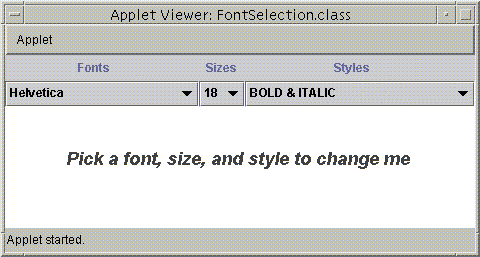
This sample allows you to change the font, size, and style of the displayed text.
The getAvailableFontFamilyNamesmethod ofGraphicsEnvironmentreturns the font family names of the fonts available on your system.The initialGraphicsEnvironment gEnv = GraphicsEnvironment.getLocalGraphicsEnvironment(); String envfonts[] = gEnv.getAvailableFontFamilyNames(); Vector vector = new Vector(); for ( int i = 1; i < envfonts.length; i++ ) { vector.addElement(envfonts[i]); }Fontobject is created with styleFont.PLAINand size 10. The other available styles are ITALIC, BOLD and BOLD+ITALIC.A newFont thisFont; ... thisFont = new Font("Arial", Font.PLAIN, 10);Fontis created from the specified font name, style and size.To use the same font family but change one or both of the style and size attributes, you can call one of thepublic void changeFont(String f, int st, String si){ Integer newSize = new Integer(si); int size = newSize.intValue(); thisFont = new Font(f, st, size); repaint(); }deriveFontmethods.To control the font used to render text, you set the font attribute in the
Graphics2Dcontext before rendering. The font attribute is set by passing aFontobject to thesetFontmethod. In this example, the font attribute is set to the newly constructedFontobject and then the string is drawn in the center of the Component using the specified font. In thepaintmethod, the font attribute of theGraphics2Dcontext is set to the newFont. The string is drawn in the middle of the component with the new font.g2.setFont(thisFont); String change = "Pick a font, size, and style to change me"; FontMetrics metrics = g2.getFontMetrics(); int width = metrics.stringWidth( change ); int height = metrics.getHeight(); g2.drawString( change, w/2-width/2, h/2-height/2 );
Note: Due to bug #4155852, FontSelection might not work properly for all font names returned from the call to getFontFamilyNames. The sample might not respond to changes in size or style and the text might not show up at all when some fontnames are chosen. In general, Courier and Helvetica work fine. In the meantime, check back periodically to see if these problems have been fixed.
The complete code for this program is in
FontSelection.java and
FontSelection.html includes the applet.
|
|
Start of Tutorial > Start of Trail | Lesson Contents |