


 |
Start of Tutorial > Start of Trail > Start of Lesson | Lesson Contents |

|
Trail: 2D Graphics |
|
Lesson: Working with Text and Fonts |
|
Help
on searching
Search technology |
Drawing Multiple Lines of Text
If you have a paragraph of styled text that you would like to fit within a specific width, you can useLineBreakMeasurer, which allows
styled text to be broken into lines that fit within a particular visual
advance. As you learned in the
Displaying Graphics with
Graphics2D trail, a TextLayout object represents
unchangeable, styled character data, but it also allows access to layout
information. The getAscent and getDescent
methods of TextLayout return information about the font that
is used to position the lines in the component. The text is stored as an
AttributedCharacterIterator so the font and point size
attributes can be stored with the text.
Example: LineBreakSample
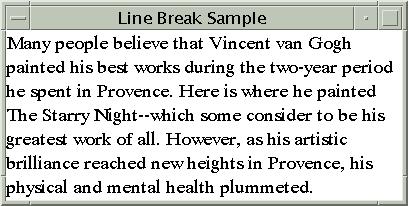
The following sample positions a paragraph of styled text within a component, usingLineBreakMeasurer,TextLayoutandAttributedCharacterIterator.
The following code creates an iterator with the string vanGogh. The start and end of the iterator is retrieved and a newLineBreakMeasureris created from the iterator.The size of the window is used to determine where the line should break and aAttributedCharacterIterator paragraph = vanGogh.getIterator(); paragraphStart = paragraph.getBeginIndex(); paragraphEnd = paragraph.getEndIndex(); lineMeasurer = new LineBreakMeasurer(paragraph, new FontRenderContext(null, false, false));TextLayoutobject is created for each line in the paragraph.Dimension size = getSize(); float formatWidth = (float) size.width; float drawPosY = 0; lineMeasurer.setPosition(paragraphStart); while (lineMeasurer.getPosition() < paragraphEnd) { TextLayout layout = lineMeasurer.nextLayout(formatWidth); // Move y-coordinate by the ascent of the layout. drawPosY += layout.getAscent(); /* Compute pen x position. If the paragraph is right-to-left, we want to align the TextLayouts to the right edge of the panel. */ float drawPosX; if (layout.isLeftToRight()) { drawPosX = 0; } else { drawPosX = formatWidth - layout.getAdvance(); } // Draw the TextLayout at (drawPosX, drawPosY). layout.draw(graphics2D, drawPosX, drawPosY); // Move y-coordinate in preparation for next layout. drawPosY += layout.getDescent() + layout.getLeading(); }The complete code for this program is in
LineBreakSample.javaandLineBreakSample.htmlincludes the applet.
|
|
Start of Tutorial > Start of Trail | Lesson Contents |