


 |
Start of Tutorial > Start of Trail > Start of Lesson | Lesson Contents |

|
Trail: Learning the Java Language |
|
Lesson: Object-Oriented Programming Concepts |
|
Help
on searching
Search technology |
What Is an Object?
As the name object-oriented implies, objects are key to understanding object-oriented technology. You can look around you now and see many examples of real-world objects: your dog, your desk, your television set, your bicycle.These real-world objects share two characteristics: they all have state and they all have behavior. For example, dogs have state (name, color, breed, hungry) and dogs have behavior (barking, fetching, and slobbering on your newly cleaned slacks). Bicycles have state (current gear, current pedal cadence, two wheels, number of gears) and behavior (braking, accelerating, slowing down, changing gears).
Software objects are modeled after real-world objects in that they, too, have state and behavior. A software object maintains its state in variables and implements its behavior with methods.
You can represent real-world objects using software objects. You might want to represent real-world dogs as software objects in an animation program or a real-world bicycle as a software object within an electronic exercise bike. However, you can also use software objects to model abstract concepts. For example, an event is a common object used in GUI window systems to represent the action of a user pressing a mouse button or a key on the keyboard.
Definition : An object is a software bundle of variables and related methods.
The following illustration is a common visual representation of a software object:
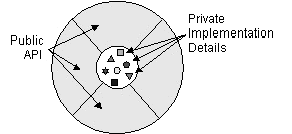
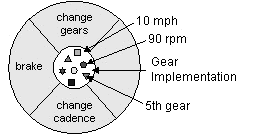
Anything that an object does not know or cannot do is excluded from the object. For example, your bicycle (probably) doesn't have a name, and it can't run, bark, or fetch. Thus there are no variables or methods for those states and behaviors in the bicycle class.
As you can see from the diagrams, the object's variables make up the center or nucleus of the object. Methods surround and hide the object's nucleus from other objects in the program. Packaging an object's variables within the protective custody of its methods is called encapsulation. Typically, encapsulation is used to hide unimportant implementation details from other objects. When you want to change gears on your bicycle, you don't need to know how the gear mechanism works, you just need to know which lever to move. Similarly in software programs, you don't need to know how a class is implemented, you just need to know which methods to invoke. Thus, the implementation details can change at any time without affecting other parts of the program.
This conceptual picture of an object--a nucleus of variables packaged within a protective membrane of methods--is an ideal representation of an object and is the ideal that designers of object-oriented systems strive for. However, it's not the whole story. Often, for implementation or efficiency reasons, an object may wish to expose some of its variables or hide some of its methods.
In many languages, including Java, an object can choose to expose its variables
to other objects allowing those other objects to inspect and even modify the variables.
Also, an object can choose to hide methods from other objects forbidding those
objects from invoking the methods. An object has complete control over whether
other objects can access its variables and methods and in fact, can specify which
other objects have access. Variable and method access in Java is covered in
Controlling Access to Members of a Class .
The Benefits of Encapsulation
Encapsulating related variables and methods into a neat software bundle is a simple yet powerful idea that provides two primary benefits to software developers:
- Modularity--The source code for an object can be written and maintained independently of the source code for other objects. Also, an object can be easily passed around in the system. You can give your bicycle to someone else and it will still work.
- Information hiding--An object has a public interface that other objects can use to communicate with it. But the object can maintain private information and methods that can be changed at any time without affecting the other objects that depend on it. You don't need to understand the gear mechanism on your bike in order to use it.
|
|
Start of Tutorial > Start of Trail > Start of Lesson | Lesson Contents |