


 |
Start of Tutorial > Start of Trail | Lesson Contents |

|
Trail: JavaBeans |
|
Help
on searching
Search technology |
Bean Customization
To prepare yourself for learing about property editors and customizers, read the following documentation:
- PropertyEditor interface
- PropertyEditorSupport class
- PropertyEditorManager class
- Customizer interface
- BeanInfo interface
A Bean's appearance and behavior can be customized at design time within Beans-compliant builder tools. Typically there are two ways to customize a Bean:
- By using a property editor. Each Bean property has its own property editor. A builder tool usually displays a Bean's property editors in a property sheet. A property editor is associated with, and edits a particular property type.
- By using customizers. Customizers give you complete GUI control over Bean customization. Customizers are used where property editors are not practical or applicable. Unlike a property editor, which is associated with a property, a customizer is associated with a Bean.
Property Editors
A property editor is a tool for customizing a particular property type. Property editors are displayed in, or activated from property sheets. A property sheet will determine a property's type, search for a relevant property editor, and display the property's current value in a relevant way.
Property editors must implement the PropertyEditor
interface. PropertyEditor provides methods that specify
how a property should be displayed in a property sheet.
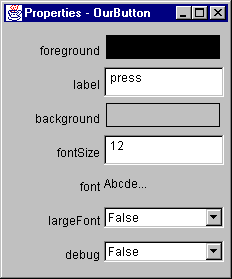
Here is the BeanBox's Properties sheet containing
OurButton properties:
- The
labelandfontSizeproperties are displayed in an editable text box. Changes can be made in place. - The
largeFontanddebugproperties are selection boxes with discrete choices. - Clicking on the
foreground,background, andfontentries brings up separate panels.
PropertyEditor methods you implement
to return non-null (or equivalent) values.
For example, the int property
editor implements the setAsText method.
This indicates to the property sheet that the
property can be displayed as a String,
hence an editable text box will be used.
The Color and Font property editors
use a separate panel, and merely use the property sheet to display
the current property value. The editor is displayed by clicking
on that value.
To display the current property value "sample" within
the property sheet you need to override isPaintable
to return true, and override paintValue
to paint the current property value in a rectangle in the property sheet.
Here's how ColorEditor implements
paintValue:
public void paintValue(java.awt.Graphics gfx, java.awt.Rectangle box) {
        Color oldColor = gfx.getColor();
        gfx.setColor(Color.black);
        gfx.drawRect(box.x, box.y, box.width-3, box.height-3);
        gfx.setColor(color);
        gfx.fillRect(box.x+1, box.y+1, box.width-4, box.height-4);
        gfx.setColor(oldColor);
}
supportsCustomEditor to
return true, and override getCustomEditor to
return a custom editor instance.
ColorEditor.getCustomEditor returns this.
Additionally, the PropertyEditorSupport
class maintains a PropertyChangeListener
list, and fires property change event notifications
to those listeners when a bound property is changed.
How Property Editors are Associated with Properties
Property editors are discovered and associated with a given property by
- Explicit association via a
BeanInfoobject. TheMoleculedemo Bean uses this technique. Within theMoleculeBeanInfoclass, theMoleculeBean's property editor is set with the following line of code:pd.setPropertyEditorClass(MoleculeNameEditor.class); - Explicit registration via
java.Beans.PropertyEditorManager.registerEditor. This method takes a pair of arguments: The class type, and the editor to be associated with that type. - Name search. If a class has no explicitly associated property
editor, then the
PropertyEditorManagersearchs for that class's property editor by:- Appending "Editor" to the fully qualified class name.
For example, for the
java.beans.ComplexNumberclass, the property editor manager would search for thejava.beans.ComplexNumberEditorclass. - Appending "Editor" to the class name and searching
a class search path. The default class path for the
BeanBox is
sun.beans.editors.
- Appending "Editor" to the fully qualified class name.
For example, for the
The BDK Property Editors
The BDK provides property editors for
the primitive data types like int,
boolean, and float, and
Color and Font class types.
The source code for these property editors is in
beans/apis/sun/beans/editors.
These sources make a good starting point for writing your
own property editors. Some things to note about
the BDK property editors:
- All the "number" properties are represented as
Stringobjects. TheIntEditoroverridesPropertyEditorSupport.setAsText. - The
booleanproperty editor is a menu of discrete choices that overrides thePropertyEditorSupport.getTagsmethod to return aString[]containing "True" and "False":public String[] getTags() { String result[] = { "True", "False" }; return result; } - The
ColorandFontproperty editors implement custom property editors. Because these objects require a more sophisticated interface to be easily edited a separate component pops up to do the property editing. OverridingsupportsCustomEditorto return true signals the property sheet that this property's editor is a custom component. TheisPaintableandpaintValuemethods are also overridden to provide color and font painting in the editors property sheet sample areas.
Note that if no property editor is found for a property, the BeanBox will not display that property in the Properties sheet.
Customizers
When you use a Bean Customizer, you get complete control over how to configure or edit a Bean. A Customizer is like an application that specifically targets a Bean's customization. Sometimes properties are insufficient for representing a Bean's configurable attributes. Customizers are used where sophisticated instructions would be needed to change a Bean, and where property editors are too primitive to achieve Bean customization.
All customizers must:
- Extend
java.awt.Componentor one of its subclasses. - Implement the
java.beans.Customizerinterface This means implementing methods to registerPropertyChangeListenerobjects, and firing property change events at those listeners when a change to the target Bean has occurred. - Implement a default constructor.
- Associate the customizer with its target class
via
BeanInfo.getBeanDescriptor.
If a Bean that has an associated Customizer is dropped into the BeanBox, you will notice a "Customize..." item on the Edit menu.
BDK Customizers
The OurButtonCustomizer serves as an example
that demonstrates the mechanics of building a customizer.
OurButtonCustomizer:
- Extends
java.awt.Panel(aComponentsubclass). - Implements the
Customizerinterface, and uses aPropertyChangeSupportobject to managePropertyChangeListenerregistration and notification. See the bound property section for aPropertyChangeSupportdescription. - Implements a default constructor:
public OurButtonCustomizer() { setLayout(null); } - Is associated with its target class,
ExplicitButton, by the followingExplicitButtonBeanInfocode:public BeanDescriptor getBeanDescriptor() { return new BeanDescriptor(beanClass, customizerClass); } ... private final static Class customizerClass = OurButtonCustomizer.class;
The BridgeTester and JDBC Select
demo Beans also have customizers.
|
|
Start of Tutorial > Start of Trail > Start of Lesson | Lesson Contents |