


 |
Start of Tutorial > Start of Trail | Lesson Contents |

|
Trail: JavaBeans |
|
Help
on searching
Search technology |
Manipulating Events in the BeanBox
You'll need a good understanding of the JDK 1.1 event mechanism before reading this section. Here's the list of recommended readings:
- Event Handling
- Chapter 6 of the JavaBeans API Specification
- Section 8.4, Design Patterns for Events of the JavaBeans API Specification.
Beans use the new event mechanism implemented in JDK 1.1, so implementing Bean events is the same as implementing events in any JDK 1.1 component. This section describes how this event mechanism is used by Beans and the BeanBox.
How the BeanBox Discovers a Beans Event Capabilities
The BeanBox uses either design pattern introspection or a
BeanInfoclass to discover what events a Bean can fire.Using Introspection to Discover the Events A Bean Fires
JavaBeans provides event-oriented design patterns to give introspecting tools the ability to discover what events a Bean can fire. For a Bean to be the source of an event, it must implement methods that add and remove listener objects for that type of event. The design patterns for these methods are
These methods let a source Bean know where to fire events. The source Bean then fires events at those listener Beans using the methods for those particular interfaces. For example, if a source Bean registerspublic void add<EventListenerType>(<EventListenerType> a) public void remove<EventListenerType>(<EventListenerType> a)ActionListenerobjects, it will fire events at those objects by calling theactionPerformedmethod on those listeners.To see events discovered using design patterns, drop an instance of
OurButtoninto the BeanBox and pull down the Edit|Events menu. This displays a list of event interfaces to whichOurButtoncan fire events. Note thatOurButtonitself only adds and removes two of these interfaces; the rest are inherited from the base class.Using BeanInfo to Define the Events a Bean Fires
You can explicitly "publish" the events a Bean fires by using a class that implements the
BeanInfointerface. TheExplicitButtondemo Bean subclassesOurButton, and provides an associatedExplicitButtonBeanInfoclass.ExplicitButtonBeanInfoimplements the following method to explicitly define interfaces to whichExplicitButtonfires events.Drop anpublic EventSetDescriptor[] getEventSetDescriptors() { try { EventSetDescriptor push = new EventSetDescriptor(beanClass, "actionPerformed", java.awt.event.ActionListener.class, "actionPerformed"); EventSetDescriptor changed = new EventSetDescriptor(beanClass, "propertyChange", java.beans.PropertyChangeListener.class, "propertyChange"); push.setDisplayName("button push"); changed.setDisplayName("bound property change"); EventSetDescriptor[] rv = { push, changed}; return rv; } catch (IntrospectionException e) { throw new Error(e.toString()); } }ExplicitButtoninstance in the BeanBox, and pull down the Edit|Events menu. Notice that only those interfaces explicitly exposed in theExplicitButtonBeanInfoclass are listed. No inherited capabilities are exposed. See The BeanInfo Interface section for more information on the BeanInfo interface.Viewing a Bean's Events in the BeanBox
If you select an
OurButtonBean in the BeanBox, then pull down the Edit|Events menu, you will see a list of interfaces thatOurButtoncan fire events at. Each interface item will, when selected, display the methods that fire different events at those interfaces. These correspond to all the events thatOurButtoncan fire.
Hooking Up Events in the BeanBox
In this example you will use two
OurButtonBean instances to stop and start an instance of the animatedJugglerBean. You will label the buttons "start" and "stop"; make the start button, when pressed, invoke theJugglerBean'sstartJugglingmethod; and make the stop button, when pressed, invoke theJugglerBean'sstopJugglingmethod.
- Start the BeanBox.
- Drop a
JugglerBean and twoOurButtonbean instances into the BeanBox.- Select an
OurButtoninstance. In the Properties sheet, change the label property to "start". Select the secondOurButtoninstance and change its label to "stop".- Select the start button. Choose the Edit|Events|action|actionPerformed menu item. This causes a rubber band line to track between the start button and the cursor. Click on the
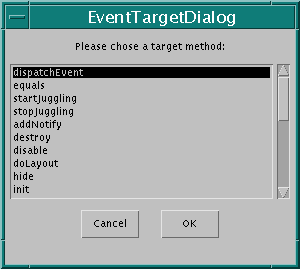
Jugglerinstance. This brings up theEventTargetDialog:This list contains Jugglermethods that take no arguments, or arguments of typeactionPerformed.- Select the
startJugglingmethod and press OK. You will see a message that the BeanBox is generating adapter classes.- Do the above two steps on the stop button, except choose the
stopJugglingmethod in theEventTargetDialog.Clicking on the start and stop buttons will now start and stop the
Juggler. Here is a general description of what happened:
- The start and stop buttons, are event sources. Event sources fire events at event targets. In this example the Juggler Bean is the event target.
- When you select the start button and choose an event method (via the Edit|Event menu item), you are choosing the type of event the event source will fire.
- When you connect the rubber band line to another Bean, you are selecting the event target Bean.
- The
EventTargetDialoglists methods that can accept that type of event or that take no parameters. When you choose a method in theEventTargetDialog, you are specifying the method that will receive the fired event, and act on it.Use the File|Save menu item to save this example to a file of your choice.
Event Adapter Classes
The BeanBox generates an adapter class that interposes between the event source and target. The adapter class implements the appropriate event listener interface (and so is the actual listener), catches the event fired by the button, and then calls the selected target Bean method. Here is the BeanBox-generated adapter class that interposes between the start button and the
JugglerBean:// Automatically generated event hookup file. package tmp.sunw.beanbox; import sunw.demo.juggler.Juggler; import java.awt.event.ActionListener; import java.awt.event.ActionEvent; public class ___Hookup_1474c0159e implements java.awt.event.ActionListener, java.io.Serializable { public void setTarget(sunw.demo.juggler.Juggler t) { target = t; } public void actionPerformed(java.awt.event.ActionEvent arg0) { target.startJuggling(arg0); } private sunw.demo.juggler.Juggler target; }The adapter implements the
ActionListenerinterface that you selected in the BeanBox's Edit|Events menu.ActionListenerdeclares one method,actionPerformed(), which is implemented by the adapter to call the target Bean method (startJuggling()) that you selected. The adapter'ssetTarget()method is called by the BeanBox to set the actual target Bean, in this caseJuggler. See section 6.7 of the JavaBeans specification for a complete discussion of event adapters.
The EventMonitor Demo Bean
The
EventMonitorBean (beans/demo/sunw/demo/encapsulatedEvents) prints out source Bean event reports, as they occur, in a scrolling listbox. To see how this works, take the following steps:When the first event is delivered,
- Drop
OurButtonandEventMonitorinstances in the BeanBox. You might want to resize theEventMonitor(and the BeanBox) to accommodate viewing the event reports.- Select the
OurButtoninstance, and choose any event method in the Edit|Events menu.- Connect the rubber band line to the
EventMonitor, and choose itsinitiateEventSourcMonitoringin theEventTargetDialog.- Select the
OurButtonBean. You will begin seeing event reports in theEventMonitor.EventMonitoranalyzes the source Bean to discover all the events it fires, creates and registers an event listener for each event type, and then reports whenever any event is fired. This is useful for debugging. Try connecting other demo Beans toEventMonitorto observer their events.
|
|
Start of Tutorial > Start of Trail > Start of Lesson | Lesson Contents |