


 |
Start of Tutorial > Start of Trail > Start of Lesson | Lesson Contents |

|
Trail: JavaBeans |
|
Lesson: Properties |
|
Help
on searching
Search technology |
Simple Properties
To get the most out of this section, first read Chapters 7, Properties, and Chapter 8, Introspection, of the JavaBeans API Specification.
Properties are aspects of a Bean's
appearance and behavior that are changeable
at design time. Properties are private
values accessed through getter and setter
methods.
Property getter and setter method names follow specific rules,
called design patterns.
By using these design pattern-based method names, JavaBeans-enabled
builder tools (and the BeanBox) can
- Discover a Bean's properties
- Determine the properties' read/write attributes
- Determine the properties' types
- Locate an appropriate property editor for each property type
- Display the properties' (usually in a property sheet)
- Alter those properties (at design time)
For example, a builder tool, on introspecting your Bean, discovers two methods:
public Color getColor() { ... }
public void setColor(Color c) { ... }
Color.
Further, the builder tool can attempt to
locate
a property editor for that type, and display the
property (usually in a property sheet)
so it can be edited.
Adding a Color Property to SimpleBean
Make the following changes to
SimpleBean.javato add a color property:
- Create and initialize a private instance variable.
private Color color = Color.green;- Write a
publicgetter method.public Color getColor(){ return color; }- Write a
publicsetter method.public void setColor(Color newColor){ color = newColor; repaint(); }- Override the
paint()method inherited fromCanvas.public void paint(Graphics g) { g.setColor(color); g.fillRect(20, 5, 20, 30); }- Compile the Bean, load it in the ToolBox, and create an instance in the BeanBox.
The results are:
SimpleBeanwill be displayed with a green centered rectangle.- The Properties sheet will contain a new
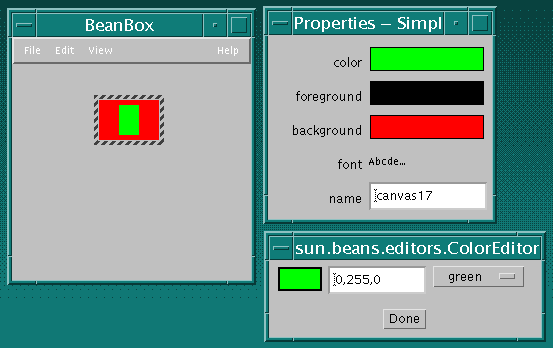
Colorproperty. The introspection mechanism will also search for aColorproperty editor. AColorproperty editor is one of the default editors supplied with the BeanBox, and is assigned asSimpleBean'sColorproperty editor. Click on theColorproperty in the Properties sheet to run this editor. Section 9.2 of the JavaBeans API Specification discusses property editors.The following figure shows the revised
SimpleBeaninstance within the BeanBox,SimpleBean's newColorproperty within the Properties sheet, and theColorproperty editor shipped with the BeanBox.
This figure has been reduced to fit on the page.
Click the image to view it at its natural size.You can change the color property by menu, or by RGB value. Try changing colors.
Here is the complete
SimpleBeansource code, revised to add acolorproperty.package sunw.demo.simple; import java.awt.*; import java.io.Serializable; public class SimpleBean extends Canvas implements Serializable{ private Color color = Color.green; //property getter method public Color getColor(){ return color; } //property setter method. Sets new SimpleBean //color and repaints. public void setColor(Color newColor){ color = newColor; repaint(); } public void paint(Graphics g) { g.setColor(color); g.fillRect(20, 5, 20, 30); } //Constructor sets inherited properties public SimpleBean(){ setSize(60,40); setBackground(Color.red); } }
|
|
Start of Tutorial > Start of Trail > Start of Lesson | Lesson Contents |