


 |
Start of Tutorial > Start of Trail > Start of Lesson | Lesson Contents |

|
Trail: Java Native Interface |
|
Lesson: Compiling and Running a Java Program with a Native Method |
|
Help
on searching
Search technology |
Step 3: Create the .h File
In this step, you use thejavah utility program to
generate a header file (a .h file) from the
HelloWorld class. The header file provides a C
function signature for the implementation of the native method
displayHelloWorld defined in that class.
Run javah now on the
HelloWorld class that you created in the previous steps.
The name of the header file is the Java class name with a
.h appended to the end. For example, the command
shown above will generate a file named HelloWorld.h.
By default, javah places the new .h file
in the same directory as the .class file.
Use the -d option to instruct
javah to place the header files in a different directory.
The Function Definition
Look at the header fileHelloWorld.h.
The#includejava example-1dot1/HelloWorld.h
Java_HelloWorld_displayHelloWorld function provides the
implementation for the HelloWorld class's native method
displayHelloWorld, which you will write in Step 4: Write the Native Method Implementation.
You use the same function signature when you write the implementation
for the native method.
If HelloWorld contained any other native methods,
their function signatures would appear here as well.
The name of the native language function that implements the
native method consists of the prefix Java_, the package
name, the class name, and the name of the native method. Between
each name component is an underscore "_" separator. Graphically, this looks as follows:
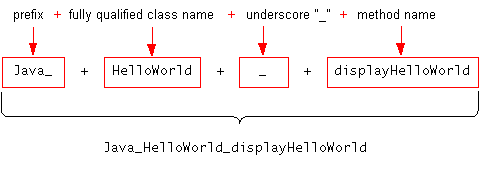
This figure has been reduced to fit on the page.
Click the image to view it at its natural size.
The native method displayHelloWorld within the
HelloWorld class becomes
Java_HelloWorld_displayHelloWorld. No package name appears in our example because HelloWorld is in the
default package, which has no name.
Notice that the implementation of the native function, as it appears in the header file, accepts two parameters even though, in its definition on the Java side, it accepts no parameters. The JNI requires every native method to have these two parameters.
The first parameter for every
native method is a JNIEnv interface pointer. It is
through this pointer that your native code accesses parameters and
objects passed to it from the Java application. The second parameter is
jobject, which references the current object
itself. In a sense, you can
think of the jobject parameter as the "this" variable in
Java. For a native instance method, such as the
displayHelloWorld method in our example, the jobject argument is
a reference to the current instance of the object. For native class methods, this argument
would be a reference to the method's Java class. Our example ignores both parameters. The next lesson,
Integrating Java and Native Programs , describes how to access data using the JNI interface pointer
env parameter. The next lesson also provides more information about jobject.
|
|
Start of Tutorial > Start of Trail > Start of Lesson | Lesson Contents |