


 |
Start of Tutorial > Start of Trail > Start of Lesson | Lesson Contents |

|
Trail: Security in JDK 1.2 |
|
Lesson: Signing Code and Granting It Permissions |
|
Help
on searching
Search technology |
Add a Policy Entry with a SignedBy Alias
To grant code signed bysusan permission to
read any files in the C:\TestData directory, you
need to create a policy entry granting this permission.
Note that "Code signed by susan"
is an abbreviated way of saying
"Code in a class file contained in a JAR file, where the JAR
file was signed using the private key corresponding to the
public key that appears in a keystore certificate in an entry
aliased by susan."
Choose the Add Policy Entry button in the main Policy Tool window. This brings up the Policy Entry dialog box:
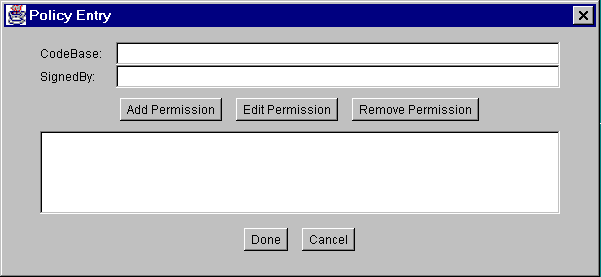
This figure has been reduced to fit on the page.
Click the image to view it at its natural size.
susan
Leave the CodeBase text box blank, to grant
all code signed by susan the permission,
no matter where it comes from.
Note: If you wanted to restrict the permission to just code signed by
susan that comes from the C:\Test\ directory,
you would type the following URL
into the CodeBase text box:
file:/C:/Test/*
To add the permission, choose the Add Permission button. This brings up the Permissions dialog box.
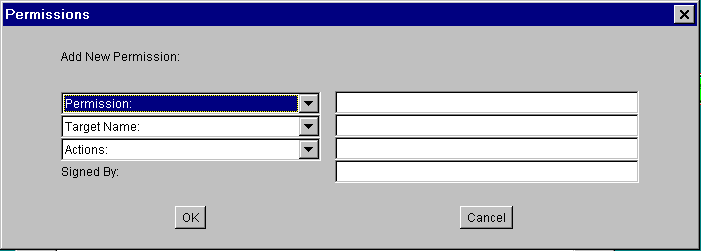
This figure has been reduced to fit on the page.
Click the image to view it at its natural size.
Do the following.
- Choose File Permission from the Permission drop-down list. The
complete permission type name (
java.io.FilePermission) now appears in the text box to the right of the drop-down list. - Type the following in the text box to the right of the list labeled
Target Name to specify all files in the
C:\TestData\directory:C:\TestData\*
- Specify read access by choosing the read option from the Actions drop-down list.
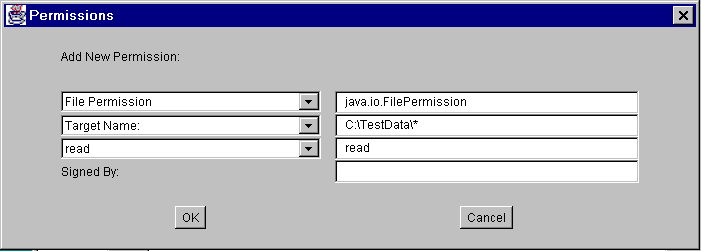
This figure has been reduced to fit on the page.
Click the image to view it at its natural size.
Choose the OK button. The new permission appears in a line in the Policy Entry dialog, as follows.
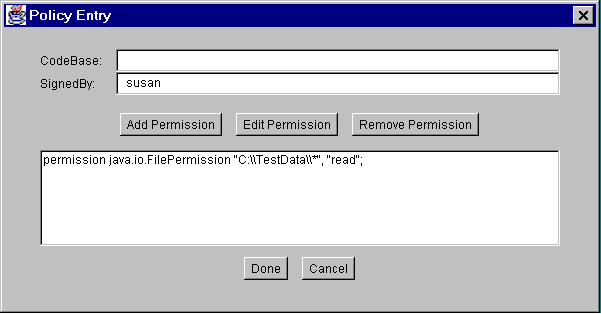
This figure has been reduced to fit on the page.
Click the image to view it at its natural size.
Note: Each backslash in the file path you typed has been replaced with two backslashes, for your convenience. Strings in a policy file are processed by a tokenizer that allows \ to be used as an escape character (for example,\nto indicate a new line), so the policy file requires two backslashes to indicate a single backslash. If you use single backslashes as your directory separators, Policy Tool automatically converts them to double backslashes for you.
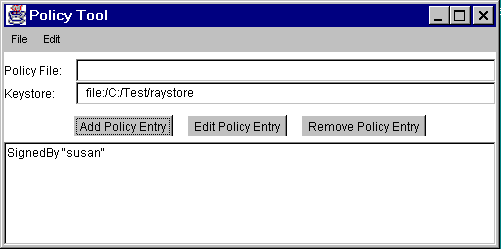
You are now done specifying this policy entry, so choose the Done button in the Policy Entry dialog. The Policy Tool window now contains a line representing the policy entry, showing the SignedBy value, as shown in the following figure.
This figure has been reduced to fit on the page.
Click the image to view it at its natural size.
|
|
Start of Tutorial > Start of Trail > Start of Lesson | Lesson Contents |