


 |
Start of Tutorial > Start of Trail > Start of Lesson | Lesson Contents |

|
Trail: Creating a GUI with JFC/Swing |
|
Lesson: Using Swing Components |
|
Help
on searching
Search technology |
Using Swing's Text Components
Swing's text components display text and optionally allow the user to edit the text. Programs need text components for tasks ranging from the straightforward (enter a word and press Return) to the complex (display and edit styled text with embedded images in an Asian language).
Swing provides five text components,
along with supporting classes and interfaces,
that meet even the most complex text requirements.
In spite of their different uses and capabilities,
all of Swing's text components inherit from
the same superclass,
JTextComponent , which provides a highly-configurable
and powerful foundation for text manipulation.
The following figure shows the JTextComponent hierarchy
and places each text component class into one of three groups:
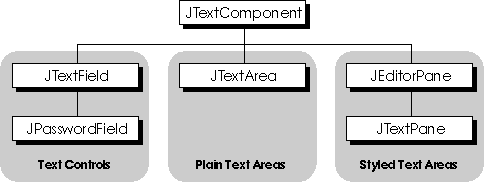
This figure has been reduced to fit on the page.
Click the image to view it at its natural size.
| Group | Description | Swing Classes |
|---|---|---|
| Text Controls | Also known simply as text fields, text controls can display and edit only one line of text and are action-based, like buttons. Use them to get a small amount of textual information from the user and take some action after the text entry is complete. |
JTextFieldand its subclass JPasswordField
|
| Plain Text Areas |
JTextArea
can display and edit multiple lines of text.
Although a text area can display text in any font,
all of the text is in the same font.
Use a text area to allow the user to enter
unformatted text of any length
or to display unformatted help information.
|
JTextArea
|
| Styled Text Areas | A styled text component can display and edit text using more than one font. Some styled text components allow embedded images and even embedded components. Styled text components are powerful and multi-faceted components suitable for high-end needs, and offer more avenues for customization than the other text components. Because they are so powerful and flexible, styled text components typically require more up-front programming to set up and use. The one exception is that editor panes can be easily loaded with formatted text from a URL, which makes them useful for displaying uneditable help information. |
JEditorPaneand its subclass JTextPane |
The next section, An Example of Using Each Text Component, shows an application that creates one of each of the Swing text components. By studying this example you can learn the basics of creating and including each text component in a program, what each component can and cannot do, and how the components differ.
The following sections discuss different aspects of text components:
- An Example of Using Each Text Component
- General Rules for Using Text Components
(This section is a prerequisite for the following two.) - How to Use Text Fields
- Concepts: About Editor Panes and Text Panes
- Summary of Text
JTextComponent
and tell you how to accomplish
some common text-related tasks.
Because JTextComponent and its subclasses
have too many features
to be completely described in this tutorial,
please periodically search
The Swing
Connection for pointers to more information.
|
|
Start of Tutorial > Start of Trail > Start of Lesson | Lesson Contents |