


 |
Start of Tutorial > Start of Trail > Start of Lesson | Lesson Contents |

|
Trail: Creating a GUI with JFC/Swing |
|
Lesson: Laying Out Components Within a Container |
|
Help
on searching
Search technology |
Doing Without a Layout Manager (Absolute Positioning)
Although it's possible to do without a layout manager, you should use a layout manager if at all possible. A layout manager makes it easy to adjust to look-and-feel-dependent component appearances, to different font sizes, and to a container's changing size. Layout managers also can be reused easily by other containers as well as other programs.
If a container
holds components whose size isn't affected
by the container's size
or by font and look-and-feel changes,
then absolute positioning might make sense.
Desktop panes,
which contain
internal frames , are in this category.
The size and position of internal frames
doesn't depend directly on the desktop pane's size.
The programmer determines the initial size and placement
of internal frames within the desktop pane,
and then the user can move or resize the frames.
A layout manager is unnecessary in this situation.
Another situation in which absolute positioning might make sense
is that of a custom container
that performs size and position calculations
that are particular to the container,
and perhaps require knowledge
of the container's specialized state.
This is the situation with
split panes.
Here's an applet that brings up a window whose content pane uses absolute positioning.
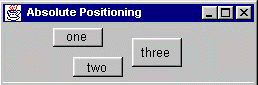
This is a picture of the applet's GUI. To run the applet, click the picture. The applet will appear in a new browser window.
Below are the instance variable declarations
and constructor implementation
of the window class.
Here's a link to
the whole program.
The program runs either within an applet,
with the help of
AppletButton,
or as an application.
public class NoneWindow extends JFrame {
    . . .
    private boolean laidOut = false;
    private JButton b1, b2, b3;

    public NoneWindow() {
        Container contentPane = getContentPane();
        contentPane.setLayout(null);

        b1 = new JButton("one");
        contentPane.add(b1);
        b2 = new JButton("two");
        contentPane.add(b2);
        b3 = new JButton("three");
        contentPane.add(b3);

        Insets insets = contentPane.getInsets();
        b1.setBounds(25 + insets.left, 5 + insets.top, 75, 20);
        b2.setBounds(55 + insets.left, 35 + insets.top, 75, 20);
        b3.setBounds(150 + insets.left, 15 + insets.top, 75, 30);
        . . .
    }
    . . .
}
|
|
Start of Tutorial > Start of Trail > Start of Lesson | Lesson Contents |