


 |
Start of Tutorial > Start of Trail > Start of Lesson | Lesson Contents |

|
Trail: Creating a GUI with JFC/Swing |
|
Lesson: Swing Features and Concepts |
|
Help
on searching
Search technology |
Swing Components and the Containment Hierarchy
Here, again, is a picture of theSwingApplication program presented in
A Quick Tour of a Swing Application's Code :
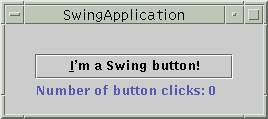
SwingApplication creates four commonly used Swing components:
- a frame, or main window (
JFrame) - a panel, sometimes called a pane (
JPanel) - a button (
JButton) - a label (
JLabel)
The frame is a top-level container.
It exists mainly to provide a place for
other Swing components to paint themselves.
The other commonly used top-level containers
are dialogs (JDialog)
and applets (JApplet).
The panel is an intermediate container.
Its only purpose is to simplify
the positioning of the button and label.
Other intermediate Swing containers,
such as scroll panes (JScrollPane)
and tabbed panes (JTabbedPane),
typically play a more visible, interactive role
in a program's GUI.
The button and label are
atomic components --
components that exist not to hold random Swing components,
but as self-sufficient entities
that present bits of information
to the user.
Often,
atomic components also get input from the user.
The Swing API provides many atomic components,
including
combo boxes (JComboBox),
text fields (JTextField),
and tables (JTable).
Here is a diagram of the containment hierarchy
for the window shown by SwingApplication.
This diagram shows each container created or used by the program,
along with the components it contains.
Note that if we add a window --
a dialog, for instance --
the new window has its own component hierarchy,
unattached to the hierarchy shown in this figure.
                        JFrame (a top-level container)
                          |
                         ...
                          |
                     content pane
                          |
                        JPanel
                          |
                  +----------------+
                  |                |
               JButton          JLabel
As the figure shows,
even the simplest Swing program
has multiple levels
in its containment hierarchy.
The root of the containment hierarchy
is always a top-level container.
The top-level container
provides a place for its descendent Swing components
to paint themselves.
Tip: To view the containment hierarchy for any frame or dialog, click its border to select it, and then press Control-Shift-F1. A list of the containment hierarchy will be written to the standard output stream.
Every top-level container indirectly contains
an intermediate container known as a content pane.
For most programs,
you don't need to know what's between a top-level container
and its content pane.
(If you really want to know, see
How to Use Root Panes.)
As a rule, the content pane contains, directly or indirectly, all of the visible components in the window's GUI. The big exception to the rule is that if the top-level container has a menu bar, then by convention the menu bar goes in a special place outside of the content pane.
To add a component to a container,
you use one of the various forms of the add method.
The add method has at least one argument --
the component to be added.
Sometimes an additional argument
is required to provide layout information.
For example,
the last line of the following code sample
specifies that the panel should be in the center
of the its container (the content pane).
For more information about the add method,
see [PENDING: layout lesson, I think].
Here is the code that adds the button and label
to the panel, and the panel to the content pane:
frame = new JFrame(...);
button = new JButton(...);
label = new JLabel(...);
pane = new JPanel();
pane.add(button);
pane.add(label);
frame.getContentPane().add(pane, BorderLayout.CENTER);
To see all the Swing components,
go to
A Visual Index to the Swing Components.
|
|
Start of Tutorial > Start of Trail > Start of Lesson | Lesson Contents |