


 |
Start of Tutorial > Start of Trail > Start of Lesson | Lesson Contents |

|
Trail: JavaBeans |
|
Lesson: Properties |
|
Help
on searching
Search technology |
Indexed Properties
To get the most out of this section, read the following documentation:
- Section 7.2 of the JavaBeans API Specification.
IndexedPropertyDescriptorclassPropertyEditorinterfacePropertyEditorSupportclass
Indexed properties represent collections of values accessed, like an array, by index. The indexed property design patterns are
Conforming to these patterns lets builder tools know that your Bean contains an indexed property.//Methods to access the entire indexed property array public <PropertyType>[] get<PropertyName>(); public void set<PropertyName>(<PropertyType>[] value); //Methods to access individual values public <PropertyType> get<PropertyName>(int index); public void set<PropertyName>(int index, <PropertyType> value);
The OurListBox demo Bean illustrates how
to use an indexed property.
OurListBox extends the
List class to provide a
Bean that presents the user with a list of choices: Choices
that you can provide and change at design time. Here's
an illustration of an OurListBox instance:
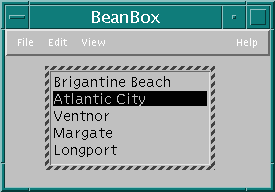
OurListBox exposes the item
indexed property with the following accessor methods:
public void setItems(String[] indexprop) {
  String[] oldValue=fieldIndexprop;
  fieldIndexprop=indexprop;
  populateListBox();
  support.firePropertyChange("items",oldValue, indexprop);
}

public void setItems(int index, String indexprop) {
  String[] oldValue=fieldIndexprop;
  fieldIndexprop[index]=indexprop;
  populateListBox();
  support.firePropertyChange("Items",oldValue, fieldIndexprop);
}

public String[] getItems() {
  return fieldIndexprop;
}

public String getItems(int index) {
  return getItems()[index];
}
When an item is set by one of the setItems() methods,
OurListBox is populated with the contents of a
String array.
Indexed properties are almost as easily exposed to builder tools as simple properties. Writing an indexed property editor, though, requires writing a custom property editor.
Indexed Property Editors
The
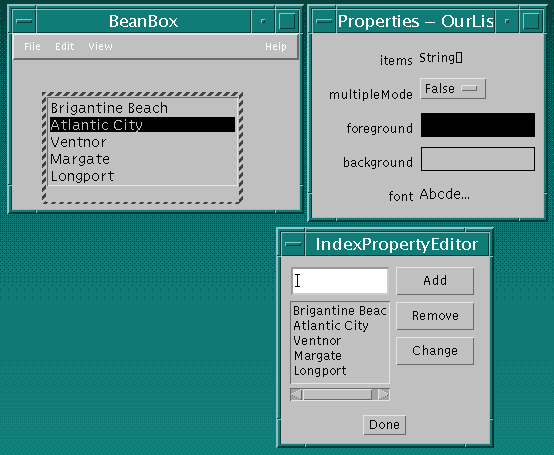
OurListBoxdemo Bean provides an associatedIndexPropertyEditorwhich is a good example of how to implement an indexed property editor. The following illustration shows anOurListBoxinstance in the BeanBox, the Properties sheet which contains an entry for the indexed propertyitems, and theIndexPropertyEditorwhich pops up when theitemsproperty entry is clicked:
This figure has been reduced to fit on the page.
Click the image to view it at its natural size.Implementing
IndexPropertyEditoris the same as implementing any custom property editor:
- Implement the
PropertyEditorinterface:public class IndexPropertyEditor extends Panel implements PropertyEditor, Action Listener {You can use thePropertyEditorSupportclass, either by subclassing or as an inner class.- Denote the custom editor in a related
BeanInfoclass.OurListBoxhas a relatedOurListBoxBeanInfoclass that contains the following code:itemsprop.setPropertyEditorClass(IndexPropertyEditor.class);
- Make the property editor a source for bound property events. The property editor will register property listeners, and fire property change events at those listeners. This is how the property changes are propagated back to the Bean (via the property sheet). So
IndexPropertyEditorinstantiates an innerPropertyChangeSupportclass:private PropertyChangeSupport support = new PropertyChangeSupport(this);Provides the ability for objects to register their interest in being notified when a property is edited:public void addPropertyChangeListener(PropertyChangeListener l) { support.addPropertyChangeListener(l); } public void removePropertyChangeListener(PropertyChangeListener l) { support.removePropertyChangeListener(l); }And fires property change events at those listeners:public void actionPerformed(ActionEvent evt) { if (evt.getSource() == addButton) { listBox.addItem(textBox.getText()); textBox.setText(""); support.firePropertyChange("", null, null); } else if (evt.getSource()== textBox) { listBox.addItem(textBox.getText()); textBox.setText(""); support.firePropertyChange("",null,null); } ... }
IndexPropertyEditormaintainslistboxas a proxy forOurListBox. When a change is made tolistbox, a property change event is fired to all listeners.When the Properties sheet, which is registered as an
IndexPropertyEditorlistener, receives a property change event fromIndexPropertyEditor, the Properties sheet callsIndexPropertyEditor.getValueto retrieve the new or changed items and update the Bean.
|
|
Start of Tutorial > Start of Trail > Start of Lesson | Lesson Contents |