


 |
Start of Tutorial > Start of Trail > Start of Lesson | Lesson Contents |

|
Trail: Security in JDK 1.2 |
|
Lesson: Quick Tour of Controlling Applications |
|
Help
on searching
Search technology |
Observe Application Freedom
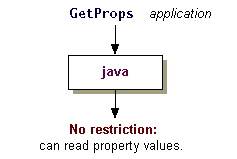
A security manager is not automatically installed when an application is running. In the next step, you'll see how to apply the same security policy to an application found on the local file system as to downloaded applets. But first, let's demonstrate that a security manager is by default not installed for an application, and thus the application has full access to resources, as was always the case in JDK 1.1.
Create a file named GetProps.java
on your computer by either copying or downloading the
GetProps.java
source code.
The examples in this lesson assume that you put GetProps.java
in the C:\Test directory if you're using a Windows system or in the
~/test directory on UNIX.
As you can see if you examine the source file, this program tries to
get (read) the values of various properties, whose names are
"os.name" , "java.version",
"user.home", and "java.home".
Now compile and run GetProps.java.
You should see output like the following:
C:\TEST>java GetProps
    About to get os.name property value
      The name of your operating system is: Windows 95
    About to get java.version property value
      The version of the JVM you are running is: 1.2
    About to get user.home property value
      Your user home directory is: C:\WINDOWS
    About to get user.name property value
      Your user name is: susanj
    About to get java.home property value
      Your JDK installation directory is: C:\JDK1.2
|
|
Start of Tutorial > Start of Trail > Start of Lesson | Lesson Contents |