


 |
Start of Tutorial > Start of Trail > Start of Lesson | Lesson Contents |

|
Trail: Security in JDK 1.2 |
|
Lesson: Quick Tour of Controlling Applications |
|
Help
on searching
Search technology |
See How to Restrict Applications
As you saw in the previous step, a security manager is not automatically installed when an application is running. To apply the same security policy to an application found on the local file system as to downloaded applets, you can invoke the interpreter with the new-Djava.security.manager
command line argument.
To execute the GetProps
application with the default security manager, type the following:
Here's the output from the program:java -Djava.security.manager GetProps
C:\TEST>java -Djava.security.manager GetProps
    About to get os.name property value
      The name of your operating system is: Windows 95
    About to get java.version property value
      The version of the JVM you are running is: JDK 1.2
    About to get user.home property value
    Caught exception java.security.AccessControlException: access denied (java.util.
      PropertyPermission user.home read)
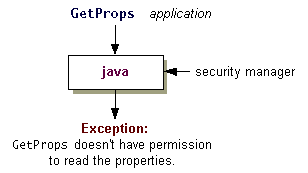
The process is shown in the following figure.
Security-Sensitive Properties
The system policy file, loaded by default, grants all code permission to access some commonly useful properties such as"os.name"and"java.version". These properties are not security-sensitive, so granting such permissions does not pose a problem.The other properties
GetPropstries to access,"user.home"and"java.home", are not among the properties for which the system policy file grants read permission. Thus as soon asGetPropsattempts to access the first of these properties ("user.home"), the security manager prevents the access and reports anAccessControlException. This exception indicates that the policy currently in effect, which consists of entries in one or more policy files, doesn't allow permission to read the"user.home"property.
The System Policy File
The system policy file is by default located at:
  Windows:
    java.home\lib\security\java.policy
  UNIX:
    java.home/lib/security/java.policy
Note that java.home represents the value of the"java.home"property, which is a system property specifying the directory into which the JDK was installed. Thus if the JDK was installed in the directory namedC:\jdk1.2on Windows and/jdk1.2on UNIX, the system policy file is located atWindows: C:\jdk1.2\lib\security\java.policy UNIX: /jdk1.2/lib/security/java.policyHere is a copy of the system policy file.
|
|
Start of Tutorial > Start of Trail > Start of Lesson | Lesson Contents |