


 |
Start of Tutorial > Start of Trail > Start of Lesson | Lesson Contents |

|
Trail: Creating a GUI with JFC/Swing |
|
Lesson: Using Swing Components |
|
Help
on searching
Search technology |
How to Use Sliders
Use aJSlider to let the user enter a numeric value bounded
by a minimum and maximum value.
By using a slider instead of a text field,
you eliminate input errors.
Here's a picture of an application that uses a slider to control animation speed:
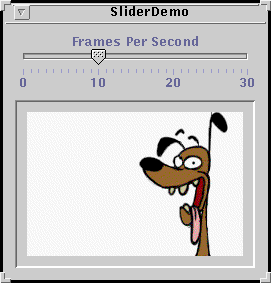
Below is the code from
Try this:
- Compile and run the application. The source file is
SliderDemo.java. You will also need the image files that compose the animation. See the examples index for links to all the files required by this example.
See Getting Started with Swing if you need help compiling or running this application.- Use the slider to adjust the animation speed.
- Push the slider to 0 to stop the animation.
SliderDemo.java
that creates the slider in the previous example.
By default, spacing for major and minor tick marks is zero. To see tick marks, you must explicitly set the spacing for either major or minor tick marks (or both) to a non-zero value and callJSlider framesPerSecond = new JSlider(JSlider.HORIZONTAL, 0, 30, FPS_INIT); framesPerSecond.addChangeListener(new SliderListener()); framesPerSecond.setMajorTickSpacing(10); framesPerSecond.setMinorTickSpacing(1); framesPerSecond.setPaintTicks(true); framesPerSecond.setPaintLabels(true); framesPerSecond.setBorder(BorderFactory.createEmptyBorder(0,0,10,0)); . . . //add the slider to the content pane contentPane.add(framesPerSecond);
setPaintTicks(true).
Just calling setPaintTicks(true) is not enough.
To display standard, numeric labels at major tick mark locations,
set the major tick spacing, then call setPaintLabels(true).
The example program provides labels for its slider this way.
But you don't have to settle for these labels.
Customizing Labels on a Slider
shows you how to customize slider labels.
When you move the slider's knob, the stateChanged method of the
slider's ChangeListener is called.
For information about change listeners,
refer to
How to Write a Change Listener.
Here is the code for this example's change listener:
class SliderListener implements ChangeListener {
    public void stateChanged(ChangeEvent e) {
        JSlider source = (JSlider)e.getSource();
        if (!source.getValueIsAdjusting()) {
	    int fps = (int)source.getValue();
	    if (fps == 0) {
	        if (!frozen) stopAnimation();
	    } else {
	        delay = 1000 / fps;
	        timer.setDelay(delay);
	        timer.setInitialDelay(delay * 10);
	        if (frozen) startAnimation();
	    }
        }
    }
}
stateChanged method
changes the animation speed only if getValueIsAdjusting
returns false.
Many change events are fired
as the user moves the slider knob.
This program is interested only
in the final result of the user's action.
Customizing Labels on a Slider
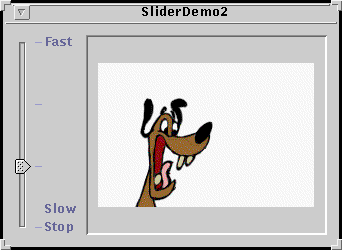
Shown below is a modified version of the previous program that uses a slider with custom labels:You can find the source for this program in SliderDemo2.java. As with the other example, you also need the image files that compose the animation. See the examples index for links to all the files required by this example.The following code creates the slider and customizes its labels:
Each key-value pair in a//Create the slider JSlider framesPerSecond = new JSlider(JSlider.VERTICAL, 0, 30, FPS_INIT); framesPerSecond.addChangeListener(new SliderListener()); framesPerSecond.setMajorTickSpacing(10); framesPerSecond.setPaintTicks(true); //Create the label table Hashtable labelTable = new Hashtable(); labelTable.put( new Integer( 0 ), new JLabel("Stop") ); labelTable.put( new Integer( 3 ), new JLabel("Slow") ); labelTable.put( new Integer( 30 ), new JLabel("Fast") ); framesPerSecond.setLabelTable( labelTable ); framesPerSecond.setPaintLabels(true); framesPerSecond.setBorder(BorderFactory.createEmptyBorder(0,0,0,10));Hashtablespecifies the position and the value of one label. The hashtable key must be anIntegerand is a value within the slider's range at which to place the label. The hashtable value must be aComponent. This program usesJLabelinstances with text only. An interesting variation would be to useJLabelinstances with icons, or perhaps buttons that move the knob to the label's position.If you want a set of numeric labels positioned at a specific interval, you can use
JSlider'screateStandardLabelsmethod to create theHashtablefor you. You can also modify the table returned bycreateStandardLabelsto then customize it.
The Slider API
The following tables list the commonly usedJSliderconstructors and methods. See The JComponent Class for tables of commonly used inherited methods.The API for using sliders falls into these categories:
Creating the Slider Constructor Purpose JSlider()Creates a horizontal slider with the range 0 to 100 and an initial value of 50. JSlider(int min, int max)
JSlider(int min, int max, int value)Creates a horizontal slider with the specified minimum and maximum values. The third intargument, when present, specifies the slider's initial value.JSlider(int orientation)
JSlider(int orientation, int min, int max, int value)Creates a slider with the specified orientation, which must be either JSlider.HORIZONTALorJSlider.VERTICAL. The last threeintarguments, when present, specify the slider's minimum, maximum, and initial values, respectively.JSlider( BoundedRangeModelCreates a horizontal slider with the specified model, which manages the slider's minimum, maximum, and current values and their relationship.
Fine Tuning the Slider's Appearance Method Purpose void setValue(int)
int getValue()Set or get the slider's current value. This method also positions the slider's knob. void setOrientation(int)
int getOrientation()Set or get the orientation of the slider. Possible values are JSlider.HORIZONTALorJSlider.VERTICAL.void setInverted(boolean)
boolean getInverted()Set or get whether the maximum is shown at the left of a horizontal slider or at the bottom of a vertical one, thereby inverting the slider's range. void setMinimum(int)
int getMinimum()
void setMaximum(int)
int getMaximum()Set or get the minimum or maximum values of the slider. Together, these methods set or get the slider's range. void setMajorTickSpacing(int)
int getMajorTickSpacing()
void setMinorTickSpacing(int)
int getMinorTickSpacing()Set or get the range between major and minor ticks. You must call setPaintTicks(true)for the tick marks to appear.void setPaintTicks(boolean)
boolean getPaintTicks()Set or get whether tick marks are painted on the slider. void setPaintLabels(boolean)
boolean getPaintLabels()Set or get whether labels are painted on the slider. You can provide custom labels with setLabelTableor get automatic labels by setting the major tick spacing to a non-zero value.void setLabelTable(Dictionary)
Dictionary getLabelTable()Set or get the labels for the slider. You must call setPaintLabels(true)for the labels to appear.createStandardLabelsis a convenience method for creating a standard set of labels.Hashtable createStandardLabels(int)
Hashtable createStandardLabels(int, int)Create a standard set of numeric labels. The first intargument specifies the increment, the secondintargument specifies the starting point. When left unspecified, the slider's minimum is used as the starting point.
Watching the Slider Operate Method Purpose void addChangeListener(ChangeListener)Register a change listener with the slider. boolean getValueIsAdjusting()Determine whether the user gesture to move the slider's knob is complete.
Examples that Use Sliders
This table shows the examples that useJSliderand where those examples are described.
Example Where Described Notes SliderDemoThis section Shows a slider with labels at major tick marks. SliderDemo2This section Shows a vertical slider with custom labels. Converterand other filesThe Anatomy of a Swing-Based Program Classes used by the Converterexample, which features two sliders that share data and have a customBoundedRangeModel.
|
|
Start of Tutorial > Start of Trail > Start of Lesson | Lesson Contents |